jackmoover11

Newbie
Joined
27.04.26
Messages
9
Reaction score
0
Points
1
dTdVDJV.png

🌐 A Better Way to Get Clean Proxies 🌐

When I wrote 🌐 Strategic Carding: Getting the Cleanest Possible IPs 🌐 I didnt really expect many people to love it and use it regularly. It did what it was supposed to do and now tons of people have access to high-quality clean, residential proxies.


But it's not always rainbows and butterflies: lately people have been having problems setting up DNS on their antidetects. Often popular antidetects are having troubles resolving DNS properly leading to intermittent connections, often a lot of people even having trouble connecting in the first place. So today Im writing this guide to help everyone once and for all have clean and fast residential proxies.

The Theory

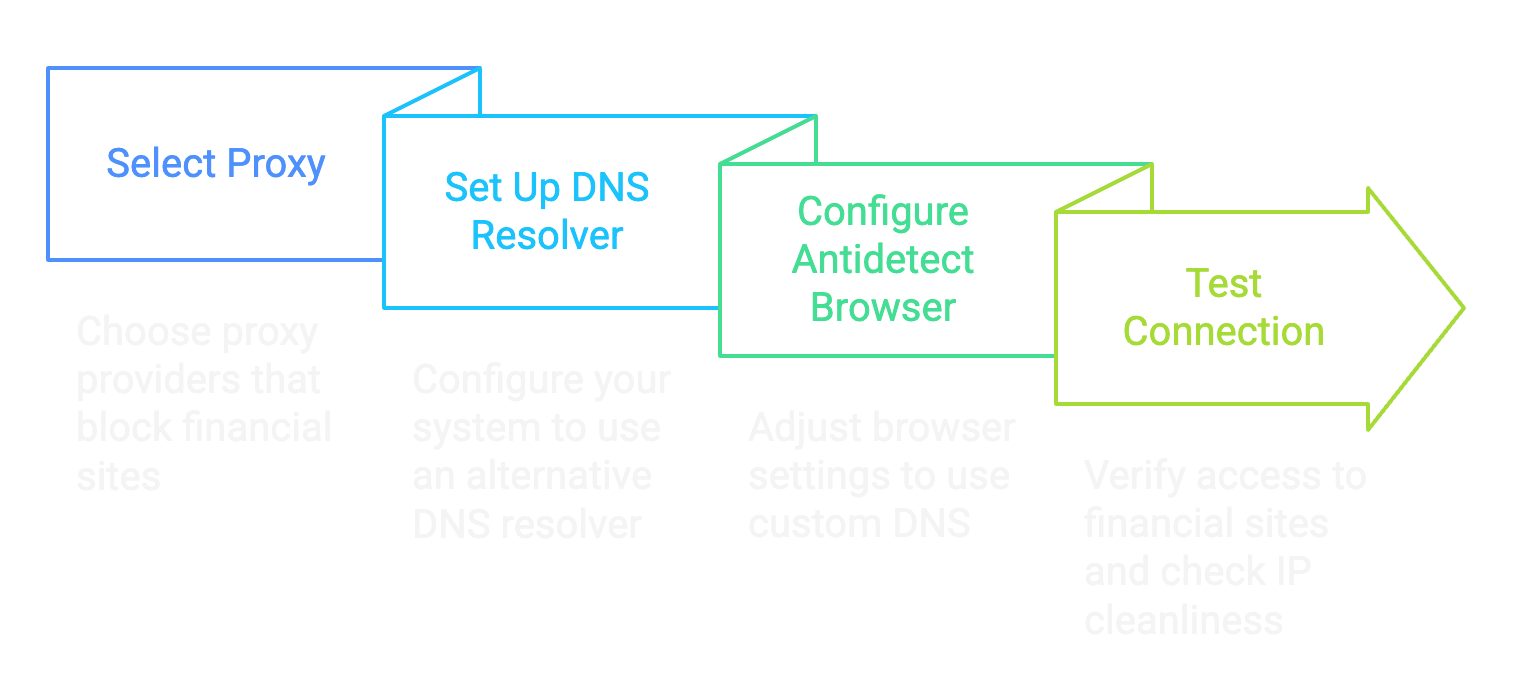
If you read through my previous guide about this the working theory is simple: we want proxy providers that block financial sites because this assures us that the proxies are unused in fraud and gives us an extremely higher chance in getting our from not getting blocked due to past history.

Wdgqh6X.png
The way we can work around this bypass is basically using our own DNS resolver, since these proxies block access through financial sites via DNS blocking. It's pretty simple: we use a different DNS (something like 1.1.1.1) than the proxy thus we resolve and not get blocked from financial sites.

The problem is there isnt a singular way antidetect browsers manage DNS resolution, and this leads to a lot of people complaining and having issues with the method.

d0c's Proxy Script

Fuck relying on third-party software with a billion features when all you need is one goddamn thing. I got tired of watching newbies struggle with complex proxy setups so I built my own lightweight Python script that does exactly what we need - nothing more, nothing less.

This script sits between your browser and your proxy provider intercepting those DNS queries and routing them through Cloudflares 1.1.1.1 instead of whatever bullshit DNS your proxy provider forces on you. It's clean, efficient and doesnt require a PhD in networking to set up, and the best part: it works with every antidetect out there.

The beauty of this approach is its simplicity. No need to mess with system-wide network settings or fight with antidetect browsers' quirky implementations. Just run the script point your browser at the local port, and youve got pristine access to financial sites through clean residential IPs.

Here's the actual code that makes this magic happen:

* Hidden text: cannot be quoted. *


Step-by-Step Guide to Install

Step 1: Install Python 3.13

View attachment 8382
  • Open the Microsoft Store on your Windows computer
  • Search for "Python 3.13" in the search bar
  • Click on the Python 3.13 app from Microsoft or Python Software Foundation
  • Click "Get" or "Install" and wait for installation to complete
  • Once installed click "Open" or close the Microsoft Store

Step 2: Create a Project Directory
  • Open Command Prompt (Press Windows+R, type "cmd" and hit Enter)
  • Create a directory for the project:
Code:
mkdir C:\bindproxy
cd C:\bindproxy

View attachment 8388

Step 3: Create a Virtual Environment
  • Create a virtual environment to manage dependencies:
Code:
python -m venv venv
  • Activate the virtual environment:
Code:
venv\Scripts\activate

View attachment 8389

Step 4: Install Required Packages
  • While in the virtual environment (you'll see (venv) at the beginning of your command line) install the required packages:
Code:
pip install dnspython PySocks tabulate

View attachment 8390

Step 5: Create the Proxy Script
  • Create a new file called bindproxy.py in the project directory using any text editor (Notepad, VS Code etc.)
  • Copy the full code above into this file and save it

Step 6: Run the Proxy
  • In Command Prompt with the virtual environment activated, run:
Code:
python bindproxy.py
Code:
d0c's Proxy Binder
1. Bind Proxy
2. Current Proxies
3. Exit

Step 7: Bind a SOCKS5 Proxy
  • Select option 1 by typing 1 and pressing Enter
  • Enter your SOCKS5proxy details when prompted:
  • The tool will bind this proxy to a random local port between 6700-6900
View attachment 8387
View attachment 8383

Step 8: Configure Your Browser to Use the Proxy
  • Open your web browser or your antidetect
  • Set the HTTP proxy to 127.0.0.1 and the port to the one shown in the tool (e.g. 6708)
  • Test the connection by visiting a website
Step 9: Verify Your Setup Works
Time to make sure this shit actually works:
  • Visit ipinfo.io in your browser - it should show a residential IP from your proxy provider, not your real IP
  • Go to DNSLeakTest.com and run a standard test - the results should show Cloudflare DNS (not your ISP or proxy provider) (Ive covered this already but make sure to use a double-barrier approach if you are using a proxy outside of your own country since 1.1.1.1 connects to the nearest CF CDN, not having a VPN will make 1.1.1.1 leak your country)
    View attachment 8385
  • Head to https://1.1.1.1/help - this Cloudflare diagnostic page will confirm if you're actually using their DNS
  • The moment of truth: navigate to https://api.stripe.com - if it loads instead of timing out congratulations! Youve successfully bypassed the proxy's financial site blocking
    View attachment 8384

Conclusion

This method is the digital equivalent of putting on a disguise and sneaking past the bouncer. Your browser connects to my local proxy script, which handles the DNS resolution through Cloudflares clean 1.1.1.1 servers then forwards everything through your residential proxy.

Why is this better than other methods? Simple - it's transparent as fuck. You can see exactly what the code is doing, modify it if needed and it works with any browser that supports HTTP proxies - no more compatibility headaches.

The proxy providers think youre just accessing random IP addresses, when in reality you're hitting up financial sites without triggering their blocks. It's the perfect solution for carders who need clean IPs that can reliably access payment processors.

Now stop fucking around with broken setups and use a tool built specifically for our needs. d0ctrine out.
Proxies are a pain in the ass ... nice work
 

astro1

Newbie
Joined
06.05.26
Messages
1
Reaction score
0
Points
1
dTdVDJV.png

🌐 A Better Way to Get Clean Proxies 🌐

When I wrote 🌐 Strategic Carding: Getting the Cleanest Possible IPs 🌐 I didnt really expect many people to love it and use it regularly. It did what it was supposed to do and now tons of people have access to high-quality clean, residential proxies.


But it's not always rainbows and butterflies: lately people have been having problems setting up DNS on their antidetects. Often popular antidetects are having troubles resolving DNS properly leading to intermittent connections, often a lot of people even having trouble connecting in the first place. So today Im writing this guide to help everyone once and for all have clean and fast residential proxies.

The Theory

If you read through my previous guide about this the working theory is simple: we want proxy providers that block financial sites because this assures us that the proxies are unused in fraud and gives us an extremely higher chance in getting our from not getting blocked due to past history.

Wdgqh6X.png
The way we can work around this bypass is basically using our own DNS resolver, since these proxies block access through financial sites via DNS blocking. It's pretty simple: we use a different DNS (something like 1.1.1.1) than the proxy thus we resolve and not get blocked from financial sites.
The problem is there isnt a singular way antidetect browsers manage DNS resolution, and this leads to a lot of people complaining and having issues with the method.

d0c's Proxy Script

Fuck relying on third-party software with a billion features when all you need is one goddamn thing. I got tired of watching newbies struggle with complex proxy setups so I built my own lightweight Python script that does exactly what we need - nothing more, nothing less.

This script sits between your browser and your proxy provider intercepting those DNS queries and routing them through Cloudflares 1.1.1.1 instead of whatever bullshit DNS your proxy provider forces on you. It's clean, efficient and doesnt require a PhD in networking to set up, and the best part: it works with every antidetect out there.

The beauty of this approach is its simplicity. No need to mess with system-wide network settings or fight with antidetect browsers' quirky implementations. Just run the script point your browser at the local port, and youve got pristine access to financial sites through clean residential IPs.

Here's the actual code that makes this magic happen:

* Hidden text: cannot be quoted. *


Step-by-Step Guide to Install

Step 1: Install Python 3.13

View attachment 8382
  • Open the Microsoft Store on your Windows computer
  • Search for "Python 3.13" in the search bar
  • Click on the Python 3.13 app from Microsoft or Python Software Foundation
  • Click "Get" or "Install" and wait for installation to complete
  • Once installed click "Open" or close the Microsoft Store

Step 2: Create a Project Directory
  • Open Command Prompt (Press Windows+R, type "cmd" and hit Enter)
  • Create a directory for the project:
Code:
mkdir C:\bindproxy
cd C:\bindproxy

View attachment 8388

Step 3: Create a Virtual Environment
  • Create a virtual environment to manage dependencies:
Code:
python -m venv venv
  • Activate the virtual environment:
Code:
venv\Scripts\activate

View attachment 8389

Step 4: Install Required Packages
  • While in the virtual environment (you'll see (venv) at the beginning of your command line) install the required packages:
Code:
pip install dnspython PySocks tabulate

View attachment 8390

Step 5: Create the Proxy Script
  • Create a new file called bindproxy.py in the project directory using any text editor (Notepad, VS Code etc.)
  • Copy the full code above into this file and save it

Step 6: Run the Proxy
  • In Command Prompt with the virtual environment activated, run:
Code:
python bindproxy.py
Code:
d0c's Proxy Binder
1. Bind Proxy
2. Current Proxies
3. Exit

Step 7: Bind a SOCKS5 Proxy
  • Select option 1 by typing 1 and pressing Enter
  • Enter your SOCKS5proxy details when prompted:
  • The tool will bind this proxy to a random local port between 6700-6900
View attachment 8387
View attachment 8383

Step 8: Configure Your Browser to Use the Proxy
  • Open your web browser or your antidetect
  • Set the HTTP proxy to 127.0.0.1 and the port to the one shown in the tool (e.g. 6708)
  • Test the connection by visiting a website
Step 9: Verify Your Setup Works
Time to make sure this shit actually works:
  • Visit ipinfo.io in your browser - it should show a residential IP from your proxy provider, not your real IP
  • Go to DNSLeakTest.com and run a standard test - the results should show Cloudflare DNS (not your ISP or proxy provider) (Ive covered this already but make sure to use a double-barrier approach if you are using a proxy outside of your own country since 1.1.1.1 connects to the nearest CF CDN, not having a VPN will make 1.1.1.1 leak your country)
    View attachment 8385
  • Head to https://1.1.1.1/help - this Cloudflare diagnostic page will confirm if you're actually using their DNS
  • The moment of truth: navigate to https://api.stripe.com - if it loads instead of timing out congratulations! Youve successfully bypassed the proxy's financial site blocking
    View attachment 8384

Conclusion

This method is the digital equivalent of putting on a disguise and sneaking past the bouncer. Your browser connects to my local proxy script, which handles the DNS resolution through Cloudflares clean 1.1.1.1 servers then forwards everything through your residential proxy.

Why is this better than other methods? Simple - it's transparent as fuck. You can see exactly what the code is doing, modify it if needed and it works with any browser that supports HTTP proxies - no more compatibility headaches.

The proxy providers think youre just accessing random IP addresses, when in reality you're hitting up financial sites without triggering their blocks. It's the perfect solution for carders who need clean IPs that can reliably access payment processors.

Now stop fucking around with broken setups and use a tool built specifically for


our needs. d0ctrine out.
Good
 

sockslocks123

Newbie
Joined
02.05.26
Messages
1
Reaction score
0
Points
1
dTdVDJV.png

🌐 A Better Way to Get Clean Proxies 🌐

When I wrote 🌐 Strategic Carding: Getting the Cleanest Possible IPs 🌐 I didnt really expect many people to love it and use it regularly. It did what it was supposed to do and now tons of people have access to high-quality clean, residential proxies.


But it's not always rainbows and butterflies: lately people have been having problems setting up DNS on their antidetects. Often popular antidetects are having troubles resolving DNS properly leading to intermittent connections, often a lot of people even having trouble connecting in the first place. So today Im writing this guide to help everyone once and for all have clean and fast residential proxies.

The Theory

If you read through my previous guide about this the working theory is simple: we want proxy providers that block financial sites because this assures us that the proxies are unused in fraud and gives us an extremely higher chance in getting our from not getting blocked due to past history.

Wdgqh6X.png
The way we can work around this bypass is basically using our own DNS resolver, since these proxies block access through financial sites via DNS blocking. It's pretty simple: we use a different DNS (something like 1.1.1.1) than the proxy thus we resolve and not get blocked from financial sites.

The problem is there isnt a singular way antidetect browsers manage DNS resolution, and this leads to a lot of people complaining and having issues with the method.

d0c's Proxy Script

Fuck relying on third-party software with a billion features when all you need is one goddamn thing. I got tired of watching newbies struggle with complex proxy setups so I built my own lightweight Python script that does exactly what we need - nothing more, nothing less.

This script sits between your browser and your proxy provider intercepting those DNS queries and routing them through Cloudflares 1.1.1.1 instead of whatever bullshit DNS your proxy provider forces on you. It's clean, efficient and doesnt require a PhD in networking to set up, and the best part: it works with every antidetect out there.

The beauty of this approach is its simplicity. No need to mess with system-wide network settings or fight with antidetect browsers' quirky implementations. Just run the script point your browser at the local port, and youve got pristine access to financial sites through clean residential IPs.

Here's the actual code that makes this magic happen:

* Hidden text: cannot be quoted. *


Step-by-Step Guide to Install

Step 1: Install Python 3.13

View attachment 8382
  • Open the Microsoft Store on your Windows computer
  • Search for "Python 3.13" in the search bar
  • Click on the Python 3.13 app from Microsoft or Python Software Foundation
  • Click "Get" or "Install" and wait for installation to complete
  • Once installed click "Open" or close the Microsoft Store

Step 2: Create a Project Directory
  • Open Command Prompt (Press Windows+R, type "cmd" and hit Enter)
  • Create a directory for the project:
Code:
mkdir C:\bindproxy
cd C:\bindproxy

View attachment 8388

Step 3: Create a Virtual Environment
  • Create a virtual environment to manage dependencies:
Code:
python -m venv venv
  • Activate the virtual environment:
Code:
venv\Scripts\activate

View attachment 8389

Step 4: Install Required Packages
  • While in the virtual environment (you'll see (venv) at the beginning of your command line) install the required packages:
Code:
pip install dnspython PySocks tabulate

View attachment 8390

Step 5: Create the Proxy Script
  • Create a new file called bindproxy.py in the project directory using any text editor (Notepad, VS Code etc.)
  • Copy the full code above into this file and save it

Step 6: Run the Proxy
  • In Command Prompt with the virtual environment activated, run:
Code:
python bindproxy.py
Code:
d0c's Proxy Binder
1. Bind Proxy
2. Current Proxies
3. Exit

Step 7: Bind a SOCKS5 Proxy
  • Select option 1 by typing 1 and pressing Enter
  • Enter your SOCKS5proxy details when prompted:
  • The tool will bind this proxy to a random local port between 6700-6900
View attachment 8387
View attachment 8383

Step 8: Configure Your Browser to Use the Proxy
  • Open your web browser or your antidetect
  • Set the HTTP proxy to 127.0.0.1 and the port to the one shown in the tool (e.g. 6708)
  • Test the connection by visiting a website
Step 9: Verify Your Setup Works
Time to make sure this shit actually works:
  • Visit ipinfo.io in your browser - it should show a residential IP from your proxy provider, not your real IP
  • Go to DNSLeakTest.com and run a standard test - the results should show Cloudflare DNS (not your ISP or proxy provider) (Ive covered this already but make sure to use a double-barrier approach if you are using a proxy outside of your own country since 1.1.1.1 connects to the nearest CF CDN, not having a VPN will make 1.1.1.1 leak your country)
    View attachment 8385
  • Head to https://1.1.1.1/help - this Cloudflare diagnostic page will confirm if you're actually using their DNS
  • The moment of truth: navigate to https://api.stripe.com - if it loads instead of timing out congratulations! Youve successfully bypassed the proxy's financial site blocking
    View attachment 8384

Conclusion

This method is the digital equivalent of putting on a disguise and sneaking past the bouncer. Your browser connects to my local proxy script, which handles the DNS resolution through Cloudflares clean 1.1.1.1 servers then forwards everything through your residential proxy.

Why is this better than other methods? Simple - it's transparent as fuck. You can see exactly what the code is doing, modify it if needed and it works with any browser that supports HTTP proxies - no more compatibility headaches.

The proxy providers think youre just accessing random IP addresses, when in reality you're hitting up financial sites without triggering their blocks. It's the perfect solution for carders who need clean IPs that can reliably access payment processors.

Now stop fucking around with broken setups and use a tool built specifically for our needs. d0ctrine out.
goat
 

alah

Newbie
Joined
22.02.26
Messages
17
Reaction score
0
Points
1
dTdVDJV.png

🌐 A Better Way to Get Clean Proxies 🌐

When I wrote 🌐 Strategic Carding: Getting the Cleanest Possible IPs 🌐 I didnt really expect many people to love it and use it regularly. It did what it was supposed to do and now tons of people have access to high-quality clean, residential proxies.


But it's not always rainbows and butterflies: lately people have been having problems setting up DNS on their antidetects. Often popular antidetects are having troubles resolving DNS properly leading to intermittent connections, often a lot of people even having trouble connecting in the first place. So today Im writing this guide to help everyone once and for all have clean and fast residential proxies.

The Theory

If you read through my previous guide about this the working theory is simple: we want proxy providers that block financial sites because this assures us that the proxies are unused in fraud and gives us an extremely higher chance in getting our from not getting blocked due to past history.

Wdgqh6X.png
The way we can work around this bypass is basically using our own DNS resolver, since these proxies block access through financial sites via DNS blocking. It's pretty simple: we use a different DNS (something like 1.1.1.1) than the proxy thus we resolve and not get blocked from financial sites.

The problem is there isnt a singular way antidetect browsers manage DNS resolution, and this leads to a lot of people complaining and having issues with the method.

d0c's Proxy Script

Fuck relying on third-party software with a billion features when all you need is one goddamn thing. I got tired of watching newbies struggle with complex proxy setups so I built my own lightweight Python script that does exactly what we need - nothing more, nothing less.

This script sits between your browser and your proxy provider intercepting those DNS queries and routing them through Cloudflares 1.1.1.1 instead of whatever bullshit DNS your proxy provider forces on you. It's clean, efficient and doesnt require a PhD in networking to set up, and the best part: it works with every antidetect out there.

The beauty of this approach is its simplicity. No need to mess with system-wide network settings or fight with antidetect browsers' quirky implementations. Just run the script point your browser at the local port, and youve got pristine access to financial sites through clean residential IPs.

Here's the actual code that makes this magic happen:

* Hidden text: cannot be quoted. *


Step-by-Step Guide to Install

Step 1: Install Python 3.13

View attachment 8382
  • Open the Microsoft Store on your Windows computer
  • Search for "Python 3.13" in the search bar
  • Click on the Python 3.13 app from Microsoft or Python Software Foundation
  • Click "Get" or "Install" and wait for installation to complete
  • Once installed click "Open" or close the Microsoft Store

Step 2: Create a Project Directory
  • Open Command Prompt (Press Windows+R, type "cmd" and hit Enter)
  • Create a directory for the project:
Code:
mkdir C:\bindproxy
cd C:\bindproxy

View attachment 8388

Step 3: Create a Virtual Environment
  • Create a virtual environment to manage dependencies:
Code:
python -m venv venv
  • Activate the virtual environment:
Code:
venv\Scripts\activate

View attachment 8389

Step 4: Install Required Packages
  • While in the virtual environment (you'll see (venv) at the beginning of your command line) install the required packages:
Code:
pip install dnspython PySocks tabulate

View attachment 8390

Step 5: Create the Proxy Script
  • Create a new file called bindproxy.py in the project directory using any text editor (Notepad, VS Code etc.)
  • Copy the full code above into this file and save it

Step 6: Run the Proxy
  • In Command Prompt with the virtual environment activated, run:
Code:
python bindproxy.py
Code:
d0c's Proxy Binder
1. Bind Proxy
2. Current Proxies
3. Exit

Step 7: Bind a SOCKS5 Proxy
  • Select option 1 by typing 1 and pressing Enter
  • Enter your SOCKS5proxy details when prompted:
  • The tool will bind this proxy to a random local port between 6700-6900
View attachment 8387
View attachment 8383

Step 8: Configure Your Browser to Use the Proxy
  • Open your web browser or your antidetect
  • Set the HTTP proxy to 127.0.0.1 and the port to the one shown in the tool (e.g. 6708)
  • Test the connection by visiting a website
Step 9: Verify Your Setup Works
Time to make sure this shit actually works:
  • Visit ipinfo.io in your browser - it should show a residential IP from your proxy provider, not your real IP
  • Go to DNSLeakTest.com and run a standard test - the results should show Cloudflare DNS (not your ISP or proxy provider) (Ive covered this already but make sure to use a double-barrier approach if you are using a proxy outside of your own country since 1.1.1.1 connects to the nearest CF CDN, not having a VPN will make 1.1.1.1 leak your country)
    View attachment 8385
  • Head to https://1.1.1.1/help - this Cloudflare diagnostic page will confirm if you're actually using their DNS
  • The moment of truth: navigate to https://api.stripe.com - if it loads instead of timing out congratulations! Youve successfully bypassed the proxy's financial site blocking
    View attachment 8384

Conclusion

This method is the digital equivalent of putting on a disguise and sneaking past the bouncer. Your browser connects to my local proxy script, which handles the DNS resolution through Cloudflares clean 1.1.1.1 servers then forwards everything through your residential proxy.

Why is this better than other methods? Simple - it's transparent as fuck. You can see exactly what the code is doing, modify it if needed and it works with any browser that supports HTTP proxies - no more compatibility headaches.

The proxy providers think youre just accessing random IP addresses, when in reality you're hitting up financial sites without triggering their blocks. It's the perfect solution for carders who need clean IPs that can reliably access payment processors.

Now stop fucking around with broken setups and use a tool built specifically for our needs. d0ctrine out.
thx!!
 

Man2026

Newbie
Joined
14.05.26
Messages
15
Reaction score
1
Points
1
dTdVDJV.png

🌐 A Better Way to Get Clean Proxies 🌐

When I wrote 🌐 Strategic Carding: Getting the Cleanest Possible IPs 🌐 I didnt really expect many people to love it and use it regularly. It did what it was supposed to do and now tons of people have access to high-quality clean, residential proxies.


But it's not always rainbows and butterflies: lately people have been having problems setting up DNS on their antidetects. Often popular antidetects are having troubles resolving DNS properly leading to intermittent connections, often a lot of people even having trouble connecting in the first place. So today Im writing this guide to help everyone once and for all have clean and fast residential proxies.

The Theory

If you read through my previous guide about this the working theory is simple: we want proxy providers that block financial sites because this assures us that the proxies are unused in fraud and gives us an extremely higher chance in getting our from not getting blocked due to past history.

Wdgqh6X.png
The way we can work around this bypass is basically using our own DNS resolver, since these proxies block access through financial sites via DNS blocking. It's pretty simple: we use a different DNS (something like 1.1.1.1) than the proxy thus we resolve and not get blocked from financial sites.

The problem is there isnt a singular way antidetect browsers manage DNS resolution, and this leads to a lot of people complaining and having issues with the method.

d0c's Proxy Script

Fuck relying on third-party software with a billion features when all you need is one goddamn thing. I got tired of watching newbies struggle with complex proxy setups so I built my own lightweight Python script that does exactly what we need - nothing more, nothing less.

This script sits between your browser and your proxy provider intercepting those DNS queries and routing them through Cloudflares 1.1.1.1 instead of whatever bullshit DNS your proxy provider forces on you. It's clean, efficient and doesnt require a PhD in networking to set up, and the best part: it works with every antidetect out there.

The beauty of this approach is its simplicity. No need to mess with system-wide network settings or fight with antidetect browsers' quirky implementations. Just run the script point your browser at the local port, and youve got pristine access to financial sites through clean residential IPs.

Here's the actual code that makes this magic happen:

* Hidden text: cannot be quoted. *


Guía paso a paso para la instalación

Paso 1: Instalar Python 3.13

View attachment 8382
  • Abre la Microsoft Store en tu ordenador con Windows.
  • Busca " Python 3.13 " en la barra de búsqueda.
  • Haz clic en la aplicación Python 3.13 de Microsoft o Python Software Foundation.
  • Haz clic en "Obtener" o "Instalar" y espera a que finalice la instalación.
  • Una vez instalada, haga clic en "Abrir" o cierre la Microsoft Store.

Paso 2: Crear un directorio de proyecto
  • Abra el símbolo del sistema (presione Windows+R, escriba "cmd" y presione Enter).
  • Crea un directorio para el proyecto:
[código]
mkdir C:\bindproxy
cd C:\bindproxy
[/código]

View attachment 8388

Paso 3: Crear un entorno virtual
  • Crea un entorno virtual para gestionar las dependencias:
[código]
python -m venv venv
[/código]
  • Activar el entorno virtual:
[código]
venv\Scripts\activate
[/código]

View attachment 8389

Paso 4: Instalar los paquetes necesarios
  • Mientras estés en el entorno virtual (verás (venv) al principio de la línea de comandos) instala los paquetes necesarios:
[código]
pip install dnspython PySocks tabulate
[/código]

View attachment 8390

Paso 5: Crear el script proxy
  • Crea un nuevo archivo llamado bindproxy.py en el directorio del proyecto usando cualquier editor de texto ( Bloc de notas , VS Code, etc.).
  • Copia el código completo anterior en este archivo y guárdalo.

Paso 6: Ejecutar el proxy
  • En el símbolo del sistema con el entorno virtual activado, ejecute:
[código]
python bindproxy.py
[/código]
[código]
Encuadernador proxy de d0c
1. Enlace de proxy
2. Proxies actuales
3. Salida
[/código]

Paso 7: Vincular un proxy SOCKS5
  • Seleccione la opción 1 escribiendo 1 y pulsando Intro.
  • Introduzca los detalles de su proxy SOCKS5 cuando se le solicite:
  • La herramienta vinculará este proxy a un puerto local aleatorio entre 6700 y 6900.
View attachment 8387
View attachment 8383

Paso 8: Configure su navegador para usar el proxy.
  • Abra su navegador web o su antidetect
  • Configure el proxy HTTP a 127.0.0.1 y el puerto al que se muestra en la herramienta (por ejemplo, 6708).
  • Prueba la conexión visitando un sitio web.
Paso 9: Verifica que tu configuración funcione.
Es hora de asegurarnos de que esta mierda realmente funcione:
  • Visita ipinfo.io en tu navegador; debería mostrarte una IP residencial de tu proveedor de proxy, no tu IP real.
  • Ve a DNSLeakTest.com y ejecuta una prueba estándar; los resultados deberían mostrar el DNS de Cloudflare (no el de tu ISP o proveedor de proxy). (Ya he hablado de esto, pero asegúrate de usar un enfoque de doble barrera si usas un proxy fuera de tu país, ya que 1.1.1.1 se conecta a la CDN de CF más cercana; no tener una VPN hará que 1.1.1.1 filtre tu país ).
    View attachment 8385
  • Dirígete a https://1.1.1.1/help : esta página de diagnóstico de Cloudflare confirmará si realmente estás utilizando su DNS.
  • El momento de la verdad: navega a https://api.stripe.com . Si carga en lugar de agotar el tiempo de espera, ¡enhorabuena! Has logrado sortear el bloqueo del sitio financiero del proxy.
    View attachment 8384

Conclusión

Este método es el equivalente digital de disfrazarse y colarse sin que el portero se dé cuenta. Tu navegador se conecta a mi script de proxy local, que gestiona la resolución DNS a través de los servidores limpios 1.1.1.1 de Cloudflare y luego reenvía todo a través de tu proxy residencial.

¿Por qué es mejor que otros métodos? Sencillo: es totalmente transparente . Puedes ver exactamente qué hace el código, modificarlo si es necesario y funciona con cualquier navegador compatible con proxies HTTP; se acabaron los problemas de compatibilidad .

Los proveedores de proxies creen que accedes a direcciones IP aleatorias, cuando en realidad accedes a sitios financieros sin activar sus bloqueos. Es la solución perfecta para los estafadores que necesitan direcciones IP limpias que puedan acceder de forma fiable a los procesadores de pago.

Deja de trastear con configuraciones defectuosas y usa una herramienta diseñada específicamente para nuestras necesidades. d0ctrine se despide.
thx
 

namibeuk

Newbie
Joined
14.05.26
Messages
1
Reaction score
0
Points
1
g
dTdVDJV.png

🌐 A Better Way to Get Clean Proxies 🌐

When I wrote 🌐 Strategic Carding: Getting the Cleanest Possible IPs 🌐 I didnt really expect many people to love it and use it regularly. It did what it was supposed to do and now tons of people have access to high-quality clean, residential proxies.


But it's not always rainbows and butterflies: lately people have been having problems setting up DNS on their antidetects. Often popular antidetects are having troubles resolving DNS properly leading to intermittent connections, often a lot of people even having trouble connecting in the first place. So today Im writing this guide to help everyone once and for all have clean and fast residential proxies.

The Theory

If you read through my previous guide about this the working theory is simple: we want proxy providers that block financial sites because this assures us that the proxies are unused in fraud and gives us an extremely higher chance in getting our from not getting blocked due to past history.

Wdgqh6X.png
The way we can work around this bypass is basically using our own DNS resolver, since these proxies block access through financial sites via DNS blocking. It's pretty simple: we use a different DNS (something like 1.1.1.1) than the proxy thus we resolve and not get blocked from financial sites.

The problem is there isnt a singular way antidetect browsers manage DNS resolution, and this leads to a lot of people complaining and having issues with the method.

d0c's Proxy Script

Fuck relying on third-party software with a billion features when all you need is one goddamn thing. I got tired of watching newbies struggle with complex proxy setups so I built my own lightweight Python script that does exactly what we need - nothing more, nothing less.

This script sits between your browser and your proxy provider intercepting those DNS queries and routing them through Cloudflares 1.1.1.1 instead of whatever bullshit DNS your proxy provider forces on you. It's clean, efficient and doesnt require a PhD in networking to set up, and the best part: it works with every antidetect out there.

The beauty of this approach is its simplicity. No need to mess with system-wide network settings or fight with antidetect browsers' quirky implementations. Just run the script point your browser at the local port, and youve got pristine access to financial sites through clean residential IPs.

Here's the actual code that makes this magic happen:

* Hidden text: cannot be quoted. *


Step-by-Step Guide to Install

Step 1: Install Python 3.13

View attachment 8382
  • Open the Microsoft Store on your Windows computer
  • Search for "Python 3.13" in the search bar
  • Click on the Python 3.13 app from Microsoft or Python Software Foundation
  • Click "Get" or "Install" and wait for installation to complete
  • Once installed click "Open" or close the Microsoft Store

Step 2: Create a Project Directory
  • Open Command Prompt (Press Windows+R, type "cmd" and hit Enter)
  • Create a directory for the project:
Code:
mkdir C:\bindproxy
cd C:\bindproxy

View attachment 8388

Step 3: Create a Virtual Environment
  • Create a virtual environment to manage dependencies:
Code:
python -m venv venv
  • Activate the virtual environment:
Code:
venv\Scripts\activate

View attachment 8389

Step 4: Install Required Packages
  • While in the virtual environment (you'll see (venv) at the beginning of your command line) install the required packages:
Code:
pip install dnspython PySocks tabulate

View attachment 8390

Step 5: Create the Proxy Script
  • Create a new file called bindproxy.py in the project directory using any text editor (Notepad, VS Code etc.)
  • Copy the full code above into this file and save it

Step 6: Run the Proxy
  • In Command Prompt with the virtual environment activated, run:
Code:
python bindproxy.py
Code:
d0c's Proxy Binder
1. Bind Proxy
2. Current Proxies
3. Exit

Step 7: Bind a SOCKS5 Proxy
  • Select option 1 by typing 1 and pressing Enter
  • Enter your SOCKS5proxy details when prompted:
  • The tool will bind this proxy to a random local port between 6700-6900
View attachment 8387
View attachment 8383

Step 8: Configure Your Browser to Use the Proxy
  • Open your web browser or your antidetect
  • Set the HTTP proxy to 127.0.0.1 and the port to the one shown in the tool (e.g. 6708)
  • Test the connection by visiting a website
Step 9: Verify Your Setup Works
Time to make sure this shit actually works:
  • Visit ipinfo.io in your browser - it should show a residential IP from your proxy provider, not your real IP
  • Go to DNSLeakTest.com and run a standard test - the results should show Cloudflare DNS (not your ISP or proxy provider) (Ive covered this already but make sure to use a double-barrier approach if you are using a proxy outside of your own country since 1.1.1.1 connects to the nearest CF CDN, not having a VPN will make 1.1.1.1 leak your country)
    View attachment 8385
  • Head to https://1.1.1.1/help - this Cloudflare diagnostic page will confirm if you're actually using their DNS
  • The moment of truth: navigate to https://api.stripe.com - if it loads instead of timing out congratulations! Youve successfully bypassed the proxy's financial site blocking
    View attachment 8384

Conclusion

This method is the digital equivalent of putting on a disguise and sneaking past the bouncer. Your browser connects to my local proxy script, which handles the DNS resolution through Cloudflares clean 1.1.1.1 servers then forwards everything through your residential proxy.

Why is this better than other methods? Simple - it's transparent as fuck. You can see exactly what the code is doing, modify it if needed and it works with any browser that supports HTTP proxies - no more compatibility headaches.

The proxy providers think youre just accessing random IP addresses, when in reality you're hitting up financial sites without triggering their blocks. It's the perfect solution for carders who need clean IPs that can reliably access payment processors.

Now stop fucking around with broken setups and use a tool built specifically for our needs. d0ctrine out.
great stuff
 
Top Bottom