
You are using an out of date browser. It may not display this or other websites correctly.
You should upgrade or use an alternative browser.
You should upgrade or use an alternative browser.
📵 A Primer on Mobile Antidetects 📵
- Thread starter d0ctrine
- Start date
-
- Tags
- mobile antidetect software mobile device anonymity mobile device authentication mobile device cloaking mobile device configuration mobile device fingerprinting mobile device hardening mobile device masking mobile device opsec mobile device privacy mobile device protection mobile device security mobile proxy setup mobile security best practices mobile security guide mobile security solutions mobile security testing mobile security threats mobile security tools secure mobile browsing
Mafioso007
Newbie
- Joined
- 04.11.25
- Messages
- 5
- Reaction score
- 0
- Points
- 1
Nice work
A Primer on Mobile Antidetects
Our iPhone guide showed how mobile devices are goldmines for carding - they blend in seamlessly with normal traffic and slip past antifraud like a ghost. But what if youre broke as fuck or just hate Apples overpriced bullshit? Dont worry theres another option thats been gaining serious traction: mobile antidetects. These services are revolutionizing the game by giving you access to real physical devices without dropping thousands on hardware. And unlike traditional antidetects that just pretend to be phones this shit actually works because youre controlling genuine mobile devices remotely.
Lets be crystal clear about what were discussing here because theres a lot of bullshit floating around about mobile antidetects. First lets eliminate what were NOT talking about:
What we ARE talking about is new technology: services that give you direct remote access to REAL physical phones sitting in datacenters. These arent emulators or virtual machines - theyre actual smartphones you can control through the cloud.
- Mobile browsers with built-in antidetect features (like "private" or "mimic" modes) - This is unreliable garbage that still leaks your real device info through WebRTC canvas fingerprinting and sensor data.
- Traditional antidetects like AdsPower Dolphin or GoLogin pretending to be phones - Pure garbage that gets flagged instantly. Their mobile emulation is a joke - wrong screen ratios broken sensors and fingerprints that gets flagged by half-decent antifraud system.
- Android emulators with spoofing tools - Dont even get me started on this. If youre using Nox or BlueStacks for work you deserve to get caught.
The major players in this space are:
- Geelark - Popular cloud phone service that excels at running native mobile apps. Browser fingerprints are less unique so focus on app-based operations.
- MoreLogin Cloud Phone - Similar to Geelark with native app support. Both services share browser fingerprints making app usage the optimal approach.
- AWS Device Farm - Enterprise-grade device cloud with extensive app testing capabilities. Requires technical expertise but offers unmatched device variety.
- Browser Stacks Real Device Cloud - Another enterprise solution focused on app testing. Complex setup but provides genuine device access for native applications.
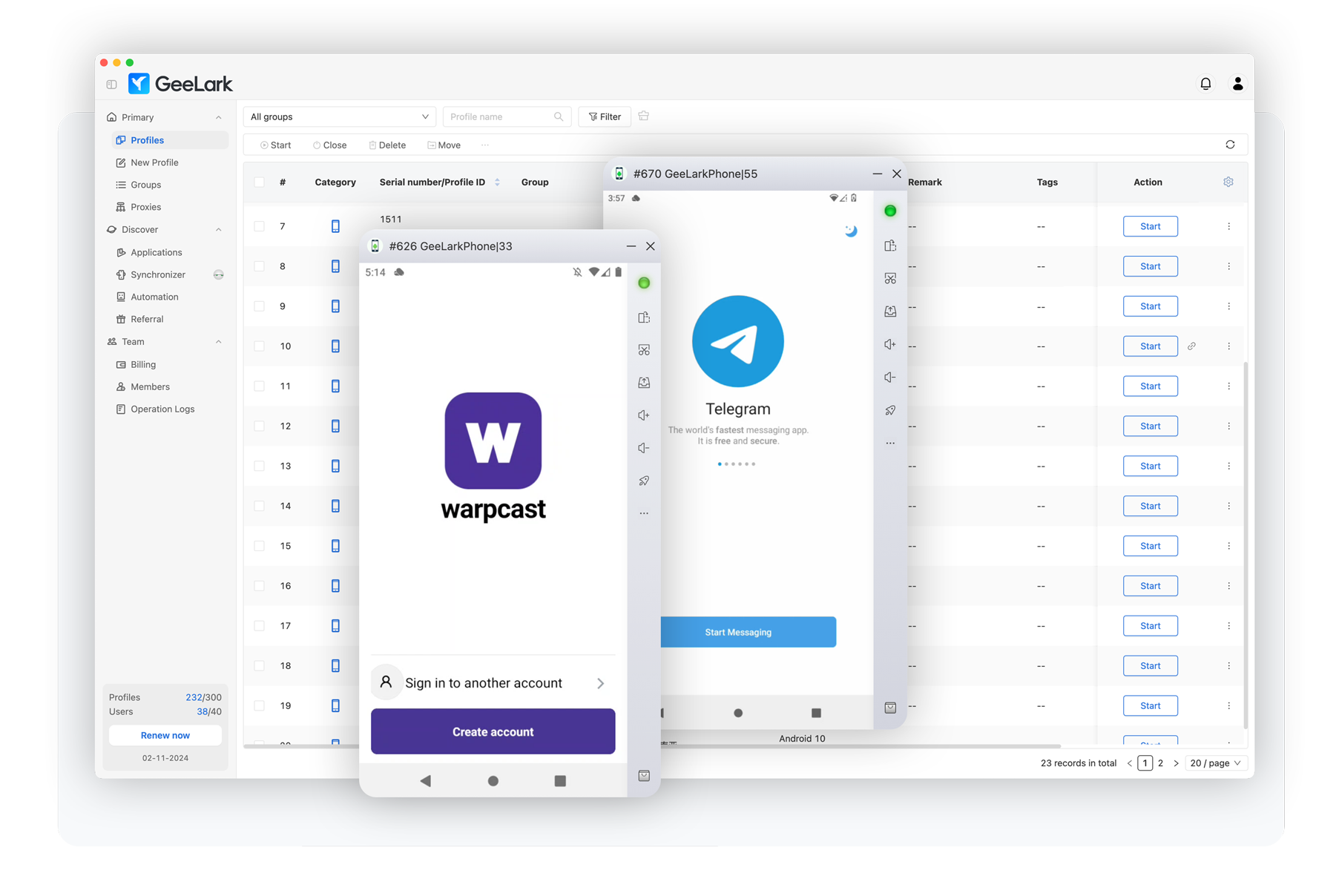
How Are They Effective?
Think about why iPhones work so well as we discussed previously - they blend in perfectly with normal traffic. Mobile antidetects operate on the exact same principle. When youre remotely controlling a popular phone configuration (using app instead of browser) you become just another face in the crowd - completely indistinguishable from thousands of regular users. The antifraud systems cant flag you because your device signature matches what they expect to see from legitimate customers.
The real magic happens with native apps. While PayPal Cash App banking sites and booking sites have transformed their websites into impenetrable fortresses with advanced fingerprinting that makes browser antidetects obsolete their mobile apps remain far more vulnerable. The native app environment simply doesnt have the same level of sophisticated detection.
Since youre not touching the browser at all you completely sidestep the fingerprinting arms race. Traditional antidetects can spoof all they want but theyll never match real hardware. Cloud phones give you legitimacy because youre controlling genuine physical devices and sticking to native apps - no browser fingerprinting to worry about.
View attachment 6552
When you fire up a mobile antidetect youre getting direct access to install and run apps exactly like a normal phone. No more wrestling with browser detection - youre using the apps exactly as they were designed to be used. Your device looks legitimate because it actually is legitimate hardware making it virtually impossible for apps to distinguish between your session and any other users phone.
Best Practices
* Hidden text: cannot be quoted. *
Lets talk device selection. For GeeLark and Cloud Phone just pick the most updated configuration - they manage the device specs for optimal performance. On AWS farm the Samsungs and Popular Chinese Phones are perfect - they disappear into the crowd of normal users. Some obscure nobody-uses phones like Xperia or LG? Wont work for long as you will be correlated sooner or later.
View attachment 6553
View attachment 6554
Your OS version needs to match what regular people are running. Most users update their phones pretty quickly these days but theres always a sweet spot - about 2-3 months behind the latest release. Thats where you want to be to perfectly blend in.
Now for a mistake I see constantly: fucking with system settings. Every time you toggle some obscure Android setting or tweak a system parameter youre making your device stick out like a sore thumb. Default is beautiful. Default is safe. The more your setup looks like it came straight out of the box the better.
Your proxy setup has to make sense too. The whole point of using mobile antidetects is looking legitimate so dont ruin it with mismatched data. Always use MOBILE PROXIES. If your IP says youre in Nebraska but your carrier info shows T-Mobile Miami youve just wasted all that effort on device authenticity.

Lastly heres what makes these services truly powerful - they run on per-minute billing. This means you can treat devices like burner phones switching them out constantly. Orders getting cancelled left and right? Generate a new one. Something feels off? Switch it up. Fresh devices mean fresh fingerprints and that constant rotation keeps you one step ahead.
Mobile Antidetects: Not Quite There Yet
Lets be real - mobile antidetects show promise but theyre not the shit yet. While running real hardware with native apps is a step forward from browser-based bullshit they still cant match the reliability of a properly configured iPhone especially when it comes to using the browser to card stuff.
The technology itself is solid - spinning up fresh devices on demand and running native apps does give you legitimacy. But dont get caught up in the hype. Browser operations are still sketchy as fuck with shared fingerprints and youre limited to specific apps that work well with these services.
For now keep your iPhone as your primary and use mobile antidetects as a supplementary tool where they make sense - specific apps testing configurations or when you need quick rotation. And remember - even with real hardware being sloppy with OPSEC will still get you burned. Match those proxies stick to stock settings and stay paranoid. The antifraud game never sleeps. d0ctrine out.
traptop516
Newbie
- Joined
- 28.05.26
- Messages
- 10
- Reaction score
- 0
- Points
- 1
Sick
Our iPhone guide showed how mobile devices are goldmines for carding - they blend in seamlessly with normal traffic and slip past antifraud like a ghost. But what if youre broke as fuck or just hate Apples overpriced bullshit? Dont worry theres another option thats been gaining serious traction: mobile antidetects. These services are revolutionizing the game by giving you access to real physical devices without dropping thousands on hardware. And unlike traditional antidetects that just pretend to be phones this shit actually works because youre controlling genuine mobile devices remotely.
Lets be crystal clear about what were discussing here because theres a lot of bullshit floating around about mobile antidetects. First lets eliminate what were NOT talking about:
What we ARE talking about is new technology: services that give you direct remote access to REAL physical phones sitting in datacenters. These arent emulators or virtual machines - theyre actual smartphones you can control through the cloud.
- Mobile browsers with built-in antidetect features (like "private" or "mimic" modes) - This is unreliable garbage that still leaks your real device info through WebRTC canvas fingerprinting and sensor data.
- Traditional antidetects like AdsPower Dolphin or GoLogin pretending to be phones - Pure garbage that gets flagged instantly. Their mobile emulation is a joke - wrong screen ratios broken sensors and fingerprints that gets flagged by half-decent antifraud system.
- Android emulators with spoofing tools - Dont even get me started on this. If youre using Nox or BlueStacks for work you deserve to get caught.
The major players in this space are:
- Geelark - Popular cloud phone service that excels at running native mobile apps. Browser fingerprints are less unique so focus on app-based operations.
- MoreLogin Cloud Phone - Similar to Geelark with native app support. Both services share browser fingerprints making app usage the optimal approach.
- AWS Device Farm - Enterprise-grade device cloud with extensive app testing capabilities. Requires technical expertise but offers unmatched device variety.
- Browser Stacks Real Device Cloud - Another enterprise solution focused on app testing. Complex setup but provides genuine device access for native applications.
How Are They Effective?
Think about why iPhones work so well as we discussed previously - they blend in perfectly with normal traffic. Mobile antidetects operate on the exact same principle. When youre remotely controlling a popular phone configuration (using app instead of browser) you become just another face in the crowd - completely indistinguishable from thousands of regular users. The antifraud systems cant flag you because your device signature matches what they expect to see from legitimate customers.
The real magic happens with native apps. While PayPal Cash App banking sites and booking sites have transformed their websites into impenetrable fortresses with advanced fingerprinting that makes browser antidetects obsolete their mobile apps remain far more vulnerable. The native app environment simply doesnt have the same level of sophisticated detection.
Since youre not touching the browser at all you completely sidestep the fingerprinting arms race. Traditional antidetects can spoof all they want but theyll never match real hardware. Cloud phones give you legitimacy because youre controlling genuine physical devices and sticking to native apps - no browser fingerprinting to worry about.
View attachment 6552
When you fire up a mobile antidetect youre getting direct access to install and run apps exactly like a normal phone. No more wrestling with browser detection - youre using the apps exactly as they were designed to be used. Your device looks legitimate because it actually is legitimate hardware making it virtually impossible for apps to distinguish between your session and any other users phone.
Best Practices
* Hidden text: cannot be quoted. *
Lets talk device selection. For GeeLark and Cloud Phone just pick the most updated configuration - they manage the device specs for optimal performance. On AWS farm the Samsungs and Popular Chinese Phones are perfect - they disappear into the crowd of normal users. Some obscure nobody-uses phones like Xperia or LG? Wont work for long as you will be correlated sooner or later.
View attachment 6553
View attachment 6554
Your OS version needs to match what regular people are running. Most users update their phones pretty quickly these days but theres always a sweet spot - about 2-3 months behind the latest release. Thats where you want to be to perfectly blend in.
Now for a mistake I see constantly: fucking with system settings. Every time you toggle some obscure Android setting or tweak a system parameter youre making your device stick out like a sore thumb. Default is beautiful. Default is safe. The more your setup looks like it came straight out of the box the better.
Your proxy setup has to make sense too. The whole point of using mobile antidetects is looking legitimate so dont ruin it with mismatched data. Always use MOBILE PROXIES. If your IP says youre in Nebraska but your carrier info shows T-Mobile Miami youve just wasted all that effort on device authenticity.
Lastly heres what makes these services truly powerful - they run on per-minute billing. This means you can treat devices like burner phones switching them out constantly. Orders getting cancelled left and right? Generate a new one. Something feels off? Switch it up. Fresh devices mean fresh fingerprints and that constant rotation keeps you one step ahead.
Mobile Antidetects: Not Quite There Yet
Lets be real - mobile antidetects show promise but theyre not the shit yet. While running real hardware with native apps is a step forward from browser-based bullshit they still cant match the reliability of a properly configured iPhone especially when it comes to using the browser to card stuff.
The technology itself is solid - spinning up fresh devices on demand and running native apps does give you legitimacy. But dont get caught up in the hype. Browser operations are still sketchy as fuck with shared fingerprints and youre limited to specific apps that work well with these services.
For now keep your iPhone as your primary and use mobile antidetects as a supplementary tool where they make sense - specific apps testing configurations or when you need quick rotation. And remember - even with real hardware being sloppy with OPSEC will still get you burned. Match those proxies stick to stock settings and stay paranoid. The antifraud game never sleeps. d0ctrine out.
Thank you
Our iPhone guide showed how mobile devices are goldmines for carding - they blend in seamlessly with normal traffic and slip past antifraud like a ghost. But what if youre broke as fuck or just hate Apples overpriced bullshit? Dont worry theres another option thats been gaining serious traction: mobile antidetects. These services are revolutionizing the game by giving you access to real physical devices without dropping thousands on hardware. And unlike traditional antidetects that just pretend to be phones this shit actually works because youre controlling genuine mobile devices remotely.
Lets be crystal clear about what were discussing here because theres a lot of bullshit floating around about mobile antidetects. First lets eliminate what were NOT talking about:
What we ARE talking about is new technology: services that give you direct remote access to REAL physical phones sitting in datacenters. These arent emulators or virtual machines - theyre actual smartphones you can control through the cloud.
- Mobile browsers with built-in antidetect features (like "private" or "mimic" modes) - This is unreliable garbage that still leaks your real device info through WebRTC canvas fingerprinting and sensor data.
- Traditional antidetects like AdsPower Dolphin or GoLogin pretending to be phones - Pure garbage that gets flagged instantly. Their mobile emulation is a joke - wrong screen ratios broken sensors and fingerprints that gets flagged by half-decent antifraud system.
- Android emulators with spoofing tools - Dont even get me started on this. If youre using Nox or BlueStacks for work you deserve to get caught.
The major players in this space are:
- Geelark - Popular cloud phone service that excels at running native mobile apps. Browser fingerprints are less unique so focus on app-based operations.
- MoreLogin Cloud Phone - Similar to Geelark with native app support. Both services share browser fingerprints making app usage the optimal approach.
- AWS Device Farm - Enterprise-grade device cloud with extensive app testing capabilities. Requires technical expertise but offers unmatched device variety.
- Browser Stacks Real Device Cloud - Another enterprise solution focused on app testing. Complex setup but provides genuine device access for native applications.
How Are They Effective?
Think about why iPhones work so well as we discussed previously - they blend in perfectly with normal traffic. Mobile antidetects operate on the exact same principle. When youre remotely controlling a popular phone configuration (using app instead of browser) you become just another face in the crowd - completely indistinguishable from thousands of regular users. The antifraud systems cant flag you because your device signature matches what they expect to see from legitimate customers.
The real magic happens with native apps. While PayPal Cash App banking sites and booking sites have transformed their websites into impenetrable fortresses with advanced fingerprinting that makes browser antidetects obsolete their mobile apps remain far more vulnerable. The native app environment simply doesnt have the same level of sophisticated detection.
Since youre not touching the browser at all you completely sidestep the fingerprinting arms race. Traditional antidetects can spoof all they want but theyll never match real hardware. Cloud phones give you legitimacy because youre controlling genuine physical devices and sticking to native apps - no browser fingerprinting to worry about.
View attachment 6552
When you fire up a mobile antidetect youre getting direct access to install and run apps exactly like a normal phone. No more wrestling with browser detection - youre using the apps exactly as they were designed to be used. Your device looks legitimate because it actually is legitimate hardware making it virtually impossible for apps to distinguish between your session and any other users phone.
Best Practices
* Hidden text: cannot be quoted. *
Lets talk device selection. For GeeLark and Cloud Phone just pick the most updated configuration - they manage the device specs for optimal performance. On AWS farm the Samsungs and Popular Chinese Phones are perfect - they disappear into the crowd of normal users. Some obscure nobody-uses phones like Xperia or LG? Wont work for long as you will be correlated sooner or later.
View attachment 6553
View attachment 6554
Your OS version needs to match what regular people are running. Most users update their phones pretty quickly these days but theres always a sweet spot - about 2-3 months behind the latest release. Thats where you want to be to perfectly blend in.
Now for a mistake I see constantly: fucking with system settings. Every time you toggle some obscure Android setting or tweak a system parameter youre making your device stick out like a sore thumb. Default is beautiful. Default is safe. The more your setup looks like it came straight out of the box the better.
Your proxy setup has to make sense too. The whole point of using mobile antidetects is looking legitimate so dont ruin it with mismatched data. Always use MOBILE PROXIES. If your IP says youre in Nebraska but your carrier info shows T-Mobile Miami youve just wasted all that effort on device authenticity.
Lastly heres what makes these services truly powerful - they run on per-minute billing. This means you can treat devices like burner phones switching them out constantly. Orders getting cancelled left and right? Generate a new one. Something feels off? Switch it up. Fresh devices mean fresh fingerprints and that constant rotation keeps you one step ahead.
Mobile Antidetects: Not Quite There Yet
Lets be real - mobile antidetects show promise but theyre not the shit yet. While running real hardware with native apps is a step forward from browser-based bullshit they still cant match the reliability of a properly configured iPhone especially when it comes to using the browser to card stuff.
The technology itself is solid - spinning up fresh devices on demand and running native apps does give you legitimacy. But dont get caught up in the hype. Browser operations are still sketchy as fuck with shared fingerprints and youre limited to specific apps that work well with these services.
For now keep your iPhone as your primary and use mobile antidetects as a supplementary tool where they make sense - specific apps testing configurations or when you need quick rotation. And remember - even with real hardware being sloppy with OPSEC will still get you burned. Match those proxies stick to stock settings and stay paranoid. The antifraud game never sleeps. d0ctrine out.
dark0099766
Newbie
- Joined
- 18.07.26
- Messages
- 2
- Reaction score
- 0
- Points
- 1
c thank you my brooo
Our iPhone guide showed how mobile devices are goldmines for carding - they blend in seamlessly with normal traffic and slip past antifraud like a ghost. But what if youre broke as fuck or just hate Apples overpriced bullshit? Dont worry theres another option thats been gaining serious traction: mobile antidetects. These services are revolutionizing the game by giving you access to real physical devices without dropping thousands on hardware. And unlike traditional antidetects that just pretend to be phones this shit actually works because youre controlling genuine mobile devices remotely.
Lets be crystal clear about what were discussing here because theres a lot of bullshit floating around about mobile antidetects. First lets eliminate what were NOT talking about:
What we ARE talking about is new technology: services that give you direct remote access to REAL physical phones sitting in datacenters. These arent emulators or virtual machines - theyre actual smartphones you can control through the cloud.
- Mobile browsers with built-in antidetect features (like "private" or "mimic" modes) - This is unreliable garbage that still leaks your real device info through WebRTC canvas fingerprinting and sensor data.
- Traditional antidetects like AdsPower Dolphin or GoLogin pretending to be phones - Pure garbage that gets flagged instantly. Their mobile emulation is a joke - wrong screen ratios broken sensors and fingerprints that gets flagged by half-decent antifraud system.
- Android emulators with spoofing tools - Dont even get me started on this. If youre using Nox or BlueStacks for work you deserve to get caught.
The major players in this space are:
- Geelark - Popular cloud phone service that excels at running native mobile apps. Browser fingerprints are less unique so focus on app-based operations.
- MoreLogin Cloud Phone - Similar to Geelark with native app support. Both services share browser fingerprints making app usage the optimal approach.
- AWS Device Farm - Enterprise-grade device cloud with extensive app testing capabilities. Requires technical expertise but offers unmatched device variety.
- Browser Stacks Real Device Cloud - Another enterprise solution focused on app testing. Complex setup but provides genuine device access for native applications.
How Are They Effective?
Think about why iPhones work so well as we discussed previously - they blend in perfectly with normal traffic. Mobile antidetects operate on the exact same principle. When youre remotely controlling a popular phone configuration (using app instead of browser) you become just another face in the crowd - completely indistinguishable from thousands of regular users. The antifraud systems cant flag you because your device signature matches what they expect to see from legitimate customers.
The real magic happens with native apps. While PayPal Cash App banking sites and booking sites have transformed their websites into impenetrable fortresses with advanced fingerprinting that makes browser antidetects obsolete their mobile apps remain far more vulnerable. The native app environment simply doesnt have the same level of sophisticated detection.
Since youre not touching the browser at all you completely sidestep the fingerprinting arms race. Traditional antidetects can spoof all they want but theyll never match real hardware. Cloud phones give you legitimacy because youre controlling genuine physical devices and sticking to native apps - no browser fingerprinting to worry about.
View attachment 6552
Ao ativar um aplicativo anti-detecção para celular, você obtém acesso direto para instalar e executar aplicativos exatamente como em um telefone normal. Chega de se preocupar com a detecção pelo navegador — você usa os aplicativos exatamente como foram projetados. Seu dispositivo parece legítimo porque, de fato, é um hardware legítimo, tornando praticamente impossível para os aplicativos distinguirem entre sua sessão e a de qualquer outro usuário.
Melhores práticas
* Texto oculto: não pode ser citado. *
Vamos falar sobre a seleção de dispositivos. Para o GeeLark e o Cloud Phone , basta escolher a configuração mais atualizada — eles gerenciam as especificações do dispositivo para um desempenho ideal. Em um ambiente AWS, os celulares Samsung e os populares celulares chineses são perfeitos — eles se misturam à multidão de usuários comuns. Celulares obscuros e pouco usados, como Xperia ou LG ? Não funcionarão por muito tempo, pois você será associado a eles mais cedo ou mais tarde.
View attachment 6553
View attachment 6554
A versão do seu sistema operacional precisa ser a mesma que a maioria das pessoas usa. Hoje em dia, a maioria dos usuários atualiza seus celulares com bastante frequência, mas sempre existe um ponto ideal — cerca de 2 a 3 meses atrás da versão mais recente. É aí que você deve estar para se integrar perfeitamente ao público.
Agora, um erro que vejo constantemente: mexer nas configurações do sistema . Cada vez que você ativa ou desativa alguma configuração obscura do Android ou altera um parâmetro do sistema, seu dispositivo fica com uma aparência totalmente personalizada. O padrão é bonito. O padrão é seguro. Quanto mais a sua configuração parecer original de fábrica, melhor.
Sua configuração de proxy também precisa fazer sentido. O objetivo principal de usar ferramentas anti-detecção em dispositivos móveis é parecer legítimo, então não estrague tudo com dados inconsistentes . Sempre use PROXIES MÓVEIS . Se o seu IP indica que você está em Nebraska , mas as informações da sua operadora mostram T-Mobile Miami, você acabou de desperdiçar todo o esforço investido na autenticidade do dispositivo.
Por fim, eis o que torna esses serviços realmente poderosos: eles funcionam com cobrança por minuto. Isso significa que você pode tratar os dispositivos como celulares descartáveis, trocando-os constantemente. Pedidos sendo cancelados o tempo todo? Gere um novo. Algo parece estranho? Troque de dispositivo. Dispositivos novos significam impressões digitais novas, e essa rotação constante mantém você um passo à frente.
Antidetecção móvel: ainda não está totalmente implementada.
Sejamos realistas: os antivírus para dispositivos móveis são promissores, mas ainda não são perfeitos. Embora usar hardware real com aplicativos nativos seja um avanço em relação às soluções baseadas em navegador, eles ainda não conseguem igualar a confiabilidade de um iPhone configurado corretamente, principalmente quando se trata de usar o navegador para copiar dados.
A tecnologia em si é sólida — criar novos dispositivos sob demanda e executar aplicativos nativos realmente confere legitimidade. Mas não se deixe levar pela empolgação . As operações do navegador ainda são extremamente instáveis devido ao compartilhamento de impressões digitais, e você fica limitado a aplicativos específicos que funcionam bem com esses serviços.
Por enquanto, mantenha seu iPhone como dispositivo principal e use aplicativos anti-detecção móveis como ferramenta complementar quando fizerem sentido — para testar configurações específicas de aplicativos ou quando precisar de uma troca rápida de dispositivos. E lembre-se: mesmo com hardware real, ser descuidado com a segurança operacional (OPSEC) ainda pode te prejudicar. Use proxies compatíveis, mantenha as configurações padrão e fique atento. O jogo antifraude nunca para. d0ctrine se despede.
Our iPhone guide showed how mobile devices are goldmines for carding - they blend in seamlessly with normal traffic and slip past antifraud like a ghost. But what if youre broke as fuck or just hate Apples overpriced bullshit? Dont worry theres another option thats been gaining serious traction: mobile antidetects. These services are revolutionizing the game by giving you access to real physical devices without dropping thousands on hardware. And unlike traditional antidetects that just pretend to be phones this shit actually works because youre controlling genuine mobile devices remotely.
Lets be crystal clear about what were discussing here because theres a lot of bullshit floating around about mobile antidetects. First lets eliminate what were NOT talking about:
What we ARE talking about is new technology: services that give you direct remote access to REAL physical phones sitting in datacenters. These arent emulators or virtual machines - theyre actual smartphones you can control through the cloud.
- Mobile browsers with built-in antidetect features (like "private" or "mimic" modes) - This is unreliable garbage that still leaks your real device info through WebRTC canvas fingerprinting and sensor data.
- Traditional antidetects like AdsPower Dolphin or GoLogin pretending to be phones - Pure garbage that gets flagged instantly. Their mobile emulation is a joke - wrong screen ratios broken sensors and fingerprints that gets flagged by half-decent antifraud system.
- Android emulators with spoofing tools - Dont even get me started on this. If youre using Nox or BlueStacks for work you deserve to get caught.
The major players in this space are:
- Geelark - Popular cloud phone service that excels at running native mobile apps. Browser fingerprints are less unique so focus on app-based operations.
- MoreLogin Cloud Phone - Similar to Geelark with native app support. Both services share browser fingerprints making app usage the optimal approach.
- AWS Device Farm - Enterprise-grade device cloud with extensive app testing capabilities. Requires technical expertise but offers unmatched device variety.
- Browser Stacks Real Device Cloud - Another enterprise solution focused on app testing. Complex setup but provides genuine device access for native applications.
How Are They Effective?
Think about why iPhones work so well as we discussed previously - they blend in perfectly with normal traffic. Mobile antidetects operate on the exact same principle. When youre remotely controlling a popular phone configuration (using app instead of browser) you become just another face in the crowd - completely indistinguishable from thousands of regular users. The antifraud systems cant flag you because your device signature matches what they expect to see from legitimate customers.
The real magic happens with native apps. While PayPal Cash App banking sites and booking sites have transformed their websites into impenetrable fortresses with advanced fingerprinting that makes browser antidetects obsolete their mobile apps remain far more vulnerable. The native app environment simply doesnt have the same level of sophisticated detection.
Since youre not touching the browser at all you completely sidestep the fingerprinting arms race. Traditional antidetects can spoof all they want but theyll never match real hardware. Cloud phones give you legitimacy because youre controlling genuine physical devices and sticking to native apps - no browser fingerprinting to worry about.
View attachment 6552
When you fire up a mobile antidetect youre getting direct access to install and run apps exactly like a normal phone. No more wrestling with browser detection - youre using the apps exactly as they were designed to be used. Your device looks legitimate because it actually is legitimate hardware making it virtually impossible for apps to distinguish between your session and any other users phone.
Best Practices
* Hidden text: cannot be quoted. *
Lets talk device selection. For GeeLark and Cloud Phone just pick the most updated configuration - they manage the device specs for optimal performance. On AWS farm the Samsungs and Popular Chinese Phones are perfect - they disappear into the crowd of normal users. Some obscure nobody-uses phones like Xperia or LG? Wont work for long as you will be correlated sooner or later.
View attachment 6553
View attachment 6554
Your OS version needs to match what regular people are running. Most users update their phones pretty quickly these days but theres always a sweet spot - about 2-3 months behind the latest release. Thats where you want to be to perfectly blend in.
Now for a mistake I see constantly: fucking with system settings. Every time you toggle some obscure Android setting or tweak a system parameter youre making your device stick out like a sore thumb. Default is beautiful. Default is safe. The more your setup looks like it came straight out of the box the better.
Your proxy setup has to make sense too. The whole point of using mobile antidetects is looking legitimate so dont ruin it with mismatched data. Always use MOBILE PROXIES. If your IP says youre in Nebraska but your carrier info shows T-Mobile Miami youve just wasted all that effort on device authenticity.
Lastly heres what makes these services truly powerful - they run on per-minute billing. This means you can treat devices like burner phones switching them out constantly. Orders getting cancelled left and right? Generate a new one. Something feels off? Switch it up. Fresh devices mean fresh fingerprints and that constant rotation keeps you one step ahead.
Mobile Antidetects: Not Quite There Yet
Lets be real - mobile antidetects show promise but theyre not the shit yet. While running real hardware with native apps is a step forward from browser-based bullshit they still cant match the reliability of a properly configured iPhone especially when it comes to using the browser to card stuff.
The technology itself is solid - spinning up fresh devices on demand and running native apps does give you legitimacy. But dont get caught up in the hype. Browser operations are still sketchy as fuck with shared fingerprints and youre limited to specific apps that work well with these services.
For now keep your iPhone as your primary and use mobile antidetects as a supplementary tool where they make sense - specific apps testing configurations or when you need quick rotation. And remember - even with real hardware being sloppy with OPSEC will still get you burned. Match those proxies stick to stock settings and stay paranoid. The antifraud game never sleeps. d0ctrine out.

IceIceBaby01
Newbie
- Joined
- 05.08.26
- Messages
- 4
- Reaction score
- 0
- Points
- 1
Our iPhone guide showed how mobile devices are goldmines for carding - they blend in seamlessly with normal traffic and slip past antifraud like a ghost. But what if youre broke as fuck or just hate Apples overpriced bullshit? Dont worry theres another option thats been gaining serious traction: mobile antidetects. These services are revolutionizing the game by giving you access to real physical devices without dropping thousands on hardware. And unlike traditional antidetects that just pretend to be phones this shit actually works because youre controlling genuine mobile devices remotely.
View attachment 6550
What is Mobile Antidetect?
View attachment 6551
Lets be crystal clear about what were discussing here because theres a lot of bullshit floating around about mobile antidetects. First lets eliminate what were NOT talking about:
What we ARE talking about is new technology: services that give you direct remote access to REAL physical phones sitting in datacenters. These arent emulators or virtual machines - theyre actual smartphones you can control through the cloud.
- Mobile browsers with built-in antidetect features (like "private" or "mimic" modes) - This is unreliable garbage that still leaks your real device info through WebRTC canvas fingerprinting and sensor data.
- Traditional antidetects like AdsPower Dolphin or GoLogin pretending to be phones - Pure garbage that gets flagged instantly. Their mobile emulation is a joke - wrong screen ratios broken sensors and fingerprints that gets flagged by half-decent antifraud system.
- Android emulators with spoofing tools - Dont even get me started on this. If youre using Nox or BlueStacks for work you deserve to get caught.
The major players in this space are:
- Geelark - Popular cloud phone service that excels at running native mobile apps. Browser fingerprints are less unique so focus on app-based operations.
- MoreLogin Cloud Phone - Similar to Geelark with native app support. Both services share browser fingerprints making app usage the optimal approach.
- AWS Device Farm - Enterprise-grade device cloud with extensive app testing capabilities. Requires technical expertise but offers unmatched device variety.
- Browser Stacks Real Device Cloud - Another enterprise solution focused on app testing. Complex setup but provides genuine device access for native applications.
How Are They Effective?
Think about why iPhones work so well as we discussed previously - they blend in perfectly with normal traffic. Mobile antidetects operate on the exact same principle. When youre remotely controlling a popular phone configuration (using app instead of browser) you become just another face in the crowd - completely indistinguishable from thousands of regular users. The antifraud systems cant flag you because your device signature matches what they expect to see from legitimate customers.
The real magic happens with native apps. While PayPal Cash App banking sites and booking sites have transformed their websites into impenetrable fortresses with advanced fingerprinting that makes browser antidetects obsolete their mobile apps remain far more vulnerable. The native app environment simply doesnt have the same level of sophisticated detection.
Since youre not touching the browser at all you completely sidestep the fingerprinting arms race. Traditional antidetects can spoof all they want but theyll never match real hardware. Cloud phones give you legitimacy because youre controlling genuine physical devices and sticking to native apps - no browser fingerprinting to worry about.
View attachment 6552
When you fire up a mobile antidetect youre getting direct access to install and run apps exactly like a normal phone. No more wrestling with browser detection - youre using the apps exactly as they were designed to be used. Your device looks legitimate because it actually is legitimate hardware making it virtually impossible for apps to distinguish between your session and any other users phone.
Best Practices
* Hidden text: cannot be quoted. *
Lets talk device selection. For GeeLark and Cloud Phone just pick the most updated configuration - they manage the device specs for optimal performance. On AWS farm the Samsungs and Popular Chinese Phones are perfect - they disappear into the crowd of normal users. Some obscure nobody-uses phones like Xperia or LG? Wont work for long as you will be correlated sooner or later.
View attachment 6553
View attachment 6554
Your OS version needs to match what regular people are running. Most users update their phones pretty quickly these days but theres always a sweet spot - about 2-3 months behind the latest release. Thats where you want to be to perfectly blend in.
Now for a mistake I see constantly: fucking with system settings. Every time you toggle some obscure Android setting or tweak a system parameter youre making your device stick out like a sore thumb. Default is beautiful. Default is safe. The more your setup looks like it came straight out of the box the better.
Your proxy setup has to make sense too. The whole point of using mobile antidetects is looking legitimate so dont ruin it with mismatched data. Always use MOBILE PROXIES. If your IP says youre in Nebraska but your carrier info shows T-Mobile Miami youve just wasted all that effort on device authenticity.
Lastly heres what makes these services truly powerful - they run on per-minute billing. This means you can treat devices like burner phones switching them out constantly. Orders getting cancelled left and right? Generate a new one. Something feels off? Switch it up. Fresh devices mean fresh fingerprints and that constant rotation keeps you one step ahead.
Mobile Antidetects: Not Quite There Yet
Lets be real - mobile antidetects show promise but theyre not the shit yet. While running real hardware with native apps is a step forward from browser-based bullshit they still cant match the reliability of a properly configured iPhone especially when it comes to using the browser to card stuff.
The technology itself is solid - spinning up fresh devices on demand and running native apps does give you legitimacy. But dont get caught up in the hype. Browser operations are still sketchy as fuck with shared fingerprints and youre limited to specific apps that work well with these services.
For now keep your iPhone as your primary and use mobile antidetects as a supplementary tool where they make sense - specific apps testing configurations or when you need quick rotation. And remember - even with real hardware being sloppy with OPSEC will still get you burned. Match those proxies stick to stock settings and stay paranoid. The antifraud game never sleeps. d0ctrine out.
Good stuff!
Last edited:
GoogP.S. We will have another guide for AWS DEVICE FARMS, and USING APPS TO CARD. These are too lengthy/complex of topics to cover here.
THXasddsasdadasdasaasdas
Our iPhone guide showed how mobile devices are goldmines for carding - they blend in seamlessly with normal traffic and slip past antifraud like a ghost. But what if youre broke as fuck or just hate Apples overpriced bullshit? Dont worry theres another option thats been gaining serious traction: mobile antidetects. These services are revolutionizing the game by giving you access to real physical devices without dropping thousands on hardware. And unlike traditional antidetects that just pretend to be phones this shit actually works because youre controlling genuine mobile devices remotely.
Lets be crystal clear about what were discussing here because theres a lot of bullshit floating around about mobile antidetects. First lets eliminate what were NOT talking about:
What we ARE talking about is new technology: services that give you direct remote access to REAL physical phones sitting in datacenters. These arent emulators or virtual machines - theyre actual smartphones you can control through the cloud.
- Mobile browsers with built-in antidetect features (like "private" or "mimic" modes) - This is unreliable garbage that still leaks your real device info through WebRTC canvas fingerprinting and sensor data.
- Traditional antidetects like AdsPower Dolphin or GoLogin pretending to be phones - Pure garbage that gets flagged instantly. Their mobile emulation is a joke - wrong screen ratios broken sensors and fingerprints that gets flagged by half-decent antifraud system.
- Android emulators with spoofing tools - Dont even get me started on this. If youre using Nox or BlueStacks for work you deserve to get caught.
The major players in this space are:
- Geelark - Popular cloud phone service that excels at running native mobile apps. Browser fingerprints are less unique so focus on app-based operations.
- MoreLogin Cloud Phone - Similar to Geelark with native app support. Both services share browser fingerprints making app usage the optimal approach.
- AWS Device Farm - Enterprise-grade device cloud with extensive app testing capabilities. Requires technical expertise but offers unmatched device variety.
- Browser Stacks Real Device Cloud - Another enterprise solution focused on app testing. Complex setup but provides genuine device access for native applications.
How Are They Effective?
Think about why iPhones work so well as we discussed previously - they blend in perfectly with normal traffic. Mobile antidetects operate on the exact same principle. When youre remotely controlling a popular phone configuration (using app instead of browser) you become just another face in the crowd - completely indistinguishable from thousands of regular users. The antifraud systems cant flag you because your device signature matches what they expect to see from legitimate customers.
The real magic happens with native apps. While PayPal Cash App banking sites and booking sites have transformed their websites into impenetrable fortresses with advanced fingerprinting that makes browser antidetects obsolete their mobile apps remain far more vulnerable. The native app environment simply doesnt have the same level of sophisticated detection.
Since youre not touching the browser at all you completely sidestep the fingerprinting arms race. Traditional antidetects can spoof all they want but theyll never match real hardware. Cloud phones give you legitimacy because youre controlling genuine physical devices and sticking to native apps - no browser fingerprinting to worry about.
View attachment 6552
When you fire up a mobile antidetect youre getting direct access to install and run apps exactly like a normal phone. No more wrestling with browser detection - youre using the apps exactly as they were designed to be used. Your device looks legitimate because it actually is legitimate hardware making it virtually impossible for apps to distinguish between your session and any other users phone.
Best Practices
* Hidden text: cannot be quoted. *
Lets talk device selection. For GeeLark and Cloud Phone just pick the most updated configuration - they manage the device specs for optimal performance. On AWS farm the Samsungs and Popular Chinese Phones are perfect - they disappear into the crowd of normal users. Some obscure nobody-uses phones like Xperia or LG? Wont work for long as you will be correlated sooner or later.
View attachment 6553
View attachment 6554
Your OS version needs to match what regular people are running. Most users update their phones pretty quickly these days but theres always a sweet spot - about 2-3 months behind the latest release. Thats where you want to be to perfectly blend in.
Now for a mistake I see constantly: fucking with system settings. Every time you toggle some obscure Android setting or tweak a system parameter youre making your device stick out like a sore thumb. Default is beautiful. Default is safe. The more your setup looks like it came straight out of the box the better.
Your proxy setup has to make sense too. The whole point of using mobile antidetects is looking legitimate so dont ruin it with mismatched data. Always use MOBILE PROXIES. If your IP says youre in Nebraska but your carrier info shows T-Mobile Miami youve just wasted all that effort on device authenticity.
Lastly heres what makes these services truly powerful - they run on per-minute billing. This means you can treat devices like burner phones switching them out constantly. Orders getting cancelled left and right? Generate a new one. Something feels off? Switch it up. Fresh devices mean fresh fingerprints and that constant rotation keeps you one step ahead.
Mobile Antidetects: Not Quite There Yet
Lets be real - mobile antidetects show promise but theyre not the shit yet. While running real hardware with native apps is a step forward from browser-based bullshit they still cant match the reliability of a properly configured iPhone especially when it comes to using the browser to card stuff.
The technology itself is solid - spinning up fresh devices on demand and running native apps does give you legitimacy. But dont get caught up in the hype. Browser operations are still sketchy as fuck with shared fingerprints and youre limited to specific apps that work well with these services.
For now keep your iPhone as your primary and use mobile antidetects as a supplementary tool where they make sense - specific apps testing configurations or when you need quick rotation. And remember - even with real hardware being sloppy with OPSEC will still get you burned. Match those proxies stick to stock settings and stay paranoid. The antifraud game never sleeps. d0ctrine out.
GoodP.S. We will have another guide for AWS DEVICE FARMS, and USING APPS TO CARD. These are too lengthy/complex of topics to cover here.
asdfwqfsdagf
Newbie
- Joined
- 15.11.25
- Messages
- 4
- Reaction score
- 0
- Points
- 1
can i view please anyways you sexy asf thanks
Our iPhone guide showed how mobile devices are goldmines for carding - they blend in seamlessly with normal traffic and slip past antifraud like a ghost. But what if youre broke as fuck or just hate Apples overpriced bullshit? Dont worry theres another option thats been gaining serious traction: mobile antidetects. These services are revolutionizing the game by giving you access to real physical devices without dropping thousands on hardware. And unlike traditional antidetects that just pretend to be phones this shit actually works because youre controlling genuine mobile devices remotely.
Lets be crystal clear about what were discussing here because theres a lot of bullshit floating around about mobile antidetects. First lets eliminate what were NOT talking about:
What we ARE talking about is new technology: services that give you direct remote access to REAL physical phones sitting in datacenters. These arent emulators or virtual machines - theyre actual smartphones you can control through the cloud.
- Mobile browsers with built-in antidetect features (like "private" or "mimic" modes) - This is unreliable garbage that still leaks your real device info through WebRTC canvas fingerprinting and sensor data.
- Traditional antidetects like AdsPower Dolphin or GoLogin pretending to be phones - Pure garbage that gets flagged instantly. Their mobile emulation is a joke - wrong screen ratios broken sensors and fingerprints that gets flagged by half-decent antifraud system.
- Android emulators with spoofing tools - Dont even get me started on this. If youre using Nox or BlueStacks for work you deserve to get caught.
The major players in this space are:
- Geelark - Popular cloud phone service that excels at running native mobile apps. Browser fingerprints are less unique so focus on app-based operations.
- MoreLogin Cloud Phone - Similar to Geelark with native app support. Both services share browser fingerprints making app usage the optimal approach.
- AWS Device Farm - Enterprise-grade device cloud with extensive app testing capabilities. Requires technical expertise but offers unmatched device variety.
- Browser Stacks Real Device Cloud - Another enterprise solution focused on app testing. Complex setup but provides genuine device access for native applications.
How Are They Effective?
Think about why iPhones work so well as we discussed previously - they blend in perfectly with normal traffic. Mobile antidetects operate on the exact same principle. When youre remotely controlling a popular phone configuration (using app instead of browser) you become just another face in the crowd - completely indistinguishable from thousands of regular users. The antifraud systems cant flag you because your device signature matches what they expect to see from legitimate customers.
The real magic happens with native apps. While PayPal Cash App banking sites and booking sites have transformed their websites into impenetrable fortresses with advanced fingerprinting that makes browser antidetects obsolete their mobile apps remain far more vulnerable. The native app environment simply doesnt have the same level of sophisticated detection.
Since youre not touching the browser at all you completely sidestep the fingerprinting arms race. Traditional antidetects can spoof all they want but theyll never match real hardware. Cloud phones give you legitimacy because youre controlling genuine physical devices and sticking to native apps - no browser fingerprinting to worry about.
View attachment 6552
When you fire up a mobile antidetect youre getting direct access to install and run apps exactly like a normal phone. No more wrestling with browser detection - youre using the apps exactly as they were designed to be used. Your device looks legitimate because it actually is legitimate hardware making it virtually impossible for apps to distinguish between your session and any other users phone.
Best Practices
* Hidden text: cannot be quoted. *
Lets talk device selection. For GeeLark and Cloud Phone just pick the most updated configuration - they manage the device specs for optimal performance. On AWS farm the Samsungs and Popular Chinese Phones are perfect - they disappear into the crowd of normal users. Some obscure nobody-uses phones like Xperia or LG? Wont work for long as you will be correlated sooner or later.
View attachment 6553
View attachment 6554
Your OS version needs to match what regular people are running. Most users update their phones pretty quickly these days but theres always a sweet spot - about 2-3 months behind the latest release. Thats where you want to be to perfectly blend in.
Now for a mistake I see constantly: fucking with system settings. Every time you toggle some obscure Android setting or tweak a system parameter youre making your device stick out like a sore thumb. Default is beautiful. Default is safe. The more your setup looks like it came straight out of the box the better.
Your proxy setup has to make sense too. The whole point of using mobile antidetects is looking legitimate so dont ruin it with mismatched data. Always use MOBILE PROXIES. If your IP says youre in Nebraska but your carrier info shows T-Mobile Miami youve just wasted all that effort on device authenticity.
Lastly heres what makes these services truly powerful - they run on per-minute billing. This means you can treat devices like burner phones switching them out constantly. Orders getting cancelled left and right? Generate a new one. Something feels off? Switch it up. Fresh devices mean fresh fingerprints and that constant rotation keeps you one step ahead.
Mobile Antidetects: Not Quite There Yet
Lets be real - mobile antidetects show promise but theyre not the shit yet. While running real hardware with native apps is a step forward from browser-based bullshit they still cant match the reliability of a properly configured iPhone especially when it comes to using the browser to card stuff.
The technology itself is solid - spinning up fresh devices on demand and running native apps does give you legitimacy. But dont get caught up in the hype. Browser operations are still sketchy as fuck with shared fingerprints and youre limited to specific apps that work well with these services.
For now keep your iPhone as your primary and use mobile antidetects as a supplementary tool where they make sense - specific apps testing configurations or when you need quick rotation. And remember - even with real hardware being sloppy with OPSEC will still get you burned. Match those proxies stick to stock settings and stay paranoid. The antifraud game never sleeps. d0ctrine out.
tonysoprano
Newbie
- Joined
- 12.09.26
- Messages
- 4
- Reaction score
- 0
- Points
- 1
nice
Our iPhone guide showed how mobile devices are goldmines for carding - they blend in seamlessly with normal traffic and slip past antifraud like a ghost. But what if youre broke as fuck or just hate Apples overpriced bullshit? Dont worry theres another option thats been gaining serious traction: mobile antidetects. These services are revolutionizing the game by giving you access to real physical devices without dropping thousands on hardware. And unlike traditional antidetects that just pretend to be phones this shit actually works because youre controlling genuine mobile devices remotely.
Lets be crystal clear about what were discussing here because theres a lot of bullshit floating around about mobile antidetects. First lets eliminate what were NOT talking about:
What we ARE talking about is new technology: services that give you direct remote access to REAL physical phones sitting in datacenters. These arent emulators or virtual machines - theyre actual smartphones you can control through the cloud.
- Mobile browsers with built-in antidetect features (like "private" or "mimic" modes) - This is unreliable garbage that still leaks your real device info through WebRTC canvas fingerprinting and sensor data.
- Traditional antidetects like AdsPower Dolphin or GoLogin pretending to be phones - Pure garbage that gets flagged instantly. Their mobile emulation is a joke - wrong screen ratios broken sensors and fingerprints that gets flagged by half-decent antifraud system.
- Android emulators with spoofing tools - Dont even get me started on this. If youre using Nox or BlueStacks for work you deserve to get caught.
The major players in this space are:
- Geelark - Popular cloud phone service that excels at running native mobile apps. Browser fingerprints are less unique so focus on app-based operations.
- MoreLogin Cloud Phone - Similar to Geelark with native app support. Both services share browser fingerprints making app usage the optimal approach.
- AWS Device Farm - Enterprise-grade device cloud with extensive app testing capabilities. Requires technical expertise but offers unmatched device variety.
- Browser Stacks Real Device Cloud - Another enterprise solution focused on app testing. Complex setup but provides genuine device access for native applications.
How Are They Effective?
Think about why iPhones work so well as we discussed previously - they blend in perfectly with normal traffic. Mobile antidetects operate on the exact same principle. When youre remotely controlling a popular phone configuration (using app instead of browser) you become just another face in the crowd - completely indistinguishable from thousands of regular users. The antifraud systems cant flag you because your device signature matches what they expect to see from legitimate customers.
The real magic happens with native apps. While PayPal Cash App banking sites and booking sites have transformed their websites into impenetrable fortresses with advanced fingerprinting that makes browser antidetects obsolete their mobile apps remain far more vulnerable. The native app environment simply doesnt have the same level of sophisticated detection.
Since youre not touching the browser at all you completely sidestep the fingerprinting arms race. Traditional antidetects can spoof all they want but theyll never match real hardware. Cloud phones give you legitimacy because youre controlling genuine physical devices and sticking to native apps - no browser fingerprinting to worry about.
View attachment 6552
When you fire up a mobile antidetect youre getting direct access to install and run apps exactly like a normal phone. No more wrestling with browser detection - youre using the apps exactly as they were designed to be used. Your device looks legitimate because it actually is legitimate hardware making it virtually impossible for apps to distinguish between your session and any other users phone.
Best Practices
* Hidden text: cannot be quoted. *
Lets talk device selection. For GeeLark and Cloud Phone just pick the most updated configuration - they manage the device specs for optimal performance. On AWS farm the Samsungs and Popular Chinese Phones are perfect - they disappear into the crowd of normal users. Some obscure nobody-uses phones like Xperia or LG? Wont work for long as you will be correlated sooner or later.
View attachment 6553
View attachment 6554
Your OS version needs to match what regular people are running. Most users update their phones pretty quickly these days but theres always a sweet spot - about 2-3 months behind the latest release. Thats where you want to be to perfectly blend in.
Now for a mistake I see constantly: fucking with system settings. Every time you toggle some obscure Android setting or tweak a system parameter youre making your device stick out like a sore thumb. Default is beautiful. Default is safe. The more your setup looks like it came straight out of the box the better.
Your proxy setup has to make sense too. The whole point of using mobile antidetects is looking legitimate so dont ruin it with mismatched data. Always use MOBILE PROXIES. If your IP says youre in Nebraska but your carrier info shows T-Mobile Miami youve just wasted all that effort on device authenticity.
Lastly heres what makes these services truly powerful - they run on per-minute billing. This means you can treat devices like burner phones switching them out constantly. Orders getting cancelled left and right? Generate a new one. Something feels off? Switch it up. Fresh devices mean fresh fingerprints and that constant rotation keeps you one step ahead.
Mobile Antidetects: Not Quite There Yet
Lets be real - mobile antidetects show promise but theyre not the shit yet. While running real hardware with native apps is a step forward from browser-based bullshit they still cant match the reliability of a properly configured iPhone especially when it comes to using the browser to card stuff.
The technology itself is solid - spinning up fresh devices on demand and running native apps does give you legitimacy. But dont get caught up in the hype. Browser operations are still sketchy as fuck with shared fingerprints and youre limited to specific apps that work well with these services.
For now keep your iPhone as your primary and use mobile antidetects as a supplementary tool where they make sense - specific apps testing configurations or when you need quick rotation. And remember - even with real hardware being sloppy with OPSEC will still get you burned. Match those proxies stick to stock settings and stay paranoid. The antifraud game never sleeps. d0ctrine out.
tonysoprano
Newbie
- Joined
- 12.09.26
- Messages
- 4
- Reaction score
- 0
- Points
- 1
thanks
Our iPhone guide showed how mobile devices are goldmines for carding - they blend in seamlessly with normal traffic and slip past antifraud like a ghost. But what if youre broke as fuck or just hate Apples overpriced bullshit? Dont worry theres another option thats been gaining serious traction: mobile antidetects. These services are revolutionizing the game by giving you access to real physical devices without dropping thousands on hardware. And unlike traditional antidetects that just pretend to be phones this shit actually works because youre controlling genuine mobile devices remotely.
Lets be crystal clear about what were discussing here because theres a lot of bullshit floating around about mobile antidetects. First lets eliminate what were NOT talking about:
What we ARE talking about is new technology: services that give you direct remote access to REAL physical phones sitting in datacenters. These arent emulators or virtual machines - theyre actual smartphones you can control through the cloud.
- Mobile browsers with built-in antidetect features (like "private" or "mimic" modes) - This is unreliable garbage that still leaks your real device info through WebRTC canvas fingerprinting and sensor data.
- Traditional antidetects like AdsPower Dolphin or GoLogin pretending to be phones - Pure garbage that gets flagged instantly. Their mobile emulation is a joke - wrong screen ratios broken sensors and fingerprints that gets flagged by half-decent antifraud system.
- Android emulators with spoofing tools - Dont even get me started on this. If youre using Nox or BlueStacks for work you deserve to get caught.
The major players in this space are:
- Geelark - Popular cloud phone service that excels at running native mobile apps. Browser fingerprints are less unique so focus on app-based operations.
- MoreLogin Cloud Phone - Similar to Geelark with native app support. Both services share browser fingerprints making app usage the optimal approach.
- AWS Device Farm - Enterprise-grade device cloud with extensive app testing capabilities. Requires technical expertise but offers unmatched device variety.
- Browser Stacks Real Device Cloud - Another enterprise solution focused on app testing. Complex setup but provides genuine device access for native applications.
How Are They Effective?
Think about why iPhones work so well as we discussed previously - they blend in perfectly with normal traffic. Mobile antidetects operate on the exact same principle. When youre remotely controlling a popular phone configuration (using app instead of browser) you become just another face in the crowd - completely indistinguishable from thousands of regular users. The antifraud systems cant flag you because your device signature matches what they expect to see from legitimate customers.
The real magic happens with native apps. While PayPal Cash App banking sites and booking sites have transformed their websites into impenetrable fortresses with advanced fingerprinting that makes browser antidetects obsolete their mobile apps remain far more vulnerable. The native app environment simply doesnt have the same level of sophisticated detection.
Since youre not touching the browser at all you completely sidestep the fingerprinting arms race. Traditional antidetects can spoof all they want but theyll never match real hardware. Cloud phones give you legitimacy because youre controlling genuine physical devices and sticking to native apps - no browser fingerprinting to worry about.
View attachment 6552
When you fire up a mobile antidetect youre getting direct access to install and run apps exactly like a normal phone. No more wrestling with browser detection - youre using the apps exactly as they were designed to be used. Your device looks legitimate because it actually is legitimate hardware making it virtually impossible for apps to distinguish between your session and any other users phone.
Best Practices
* Hidden text: cannot be quoted. *
Lets talk device selection. For GeeLark and Cloud Phone just pick the most updated configuration - they manage the device specs for optimal performance. On AWS farm the Samsungs and Popular Chinese Phones are perfect - they disappear into the crowd of normal users. Some obscure nobody-uses phones like Xperia or LG? Wont work for long as you will be correlated sooner or later.
View attachment 6553
View attachment 6554
Your OS version needs to match what regular people are running. Most users update their phones pretty quickly these days but theres always a sweet spot - about 2-3 months behind the latest release. Thats where you want to be to perfectly blend in.
Now for a mistake I see constantly: fucking with system settings. Every time you toggle some obscure Android setting or tweak a system parameter youre making your device stick out like a sore thumb. Default is beautiful. Default is safe. The more your setup looks like it came straight out of the box the better.
Your proxy setup has to make sense too. The whole point of using mobile antidetects is looking legitimate so dont ruin it with mismatched data. Always use MOBILE PROXIES. If your IP says youre in Nebraska but your carrier info shows T-Mobile Miami youve just wasted all that effort on device authenticity.
Lastly heres what makes these services truly powerful - they run on per-minute billing. This means you can treat devices like burner phones switching them out constantly. Orders getting cancelled left and right? Generate a new one. Something feels off? Switch it up. Fresh devices mean fresh fingerprints and that constant rotation keeps you one step ahead.
Mobile Antidetects: Not Quite There Yet
Lets be real - mobile antidetects show promise but theyre not the shit yet. While running real hardware with native apps is a step forward from browser-based bullshit they still cant match the reliability of a properly configured iPhone especially when it comes to using the browser to card stuff.
The technology itself is solid - spinning up fresh devices on demand and running native apps does give you legitimacy. But dont get caught up in the hype. Browser operations are still sketchy as fuck with shared fingerprints and youre limited to specific apps that work well with these services.
For now keep your iPhone as your primary and use mobile antidetects as a supplementary tool where they make sense - specific apps testing configurations or when you need quick rotation. And remember - even with real hardware being sloppy with OPSEC will still get you burned. Match those proxies stick to stock settings and stay paranoid. The antifraud game never sleeps. d0ctrine out.
Thanks
Our iPhone guide showed how mobile devices are goldmines for carding - they blend in seamlessly with normal traffic and slip past antifraud like a ghost. But what if youre broke as fuck or just hate Apples overpriced bullshit? Dont worry theres another option thats been gaining serious traction: mobile antidetects. These services are revolutionizing the game by giving you access to real physical devices without dropping thousands on hardware. And unlike traditional antidetects that just pretend to be phones this shit actually works because youre controlling genuine mobile devices remotely.
Lets be crystal clear about what were discussing here because theres a lot of bullshit floating around about mobile antidetects. First lets eliminate what were NOT talking about:
What we ARE talking about is new technology: services that give you direct remote access to REAL physical phones sitting in datacenters. These arent emulators or virtual machines - theyre actual smartphones you can control through the cloud.
- Mobile browsers with built-in antidetect features (like "private" or "mimic" modes) - This is unreliable garbage that still leaks your real device info through WebRTC canvas fingerprinting and sensor data.
- Traditional antidetects like AdsPower Dolphin or GoLogin pretending to be phones - Pure garbage that gets flagged instantly. Their mobile emulation is a joke - wrong screen ratios broken sensors and fingerprints that gets flagged by half-decent antifraud system.
- Android emulators with spoofing tools - Dont even get me started on this. If youre using Nox or BlueStacks for work you deserve to get caught.
The major players in this space are:
- Geelark - Popular cloud phone service that excels at running native mobile apps. Browser fingerprints are less unique so focus on app-based operations.
- MoreLogin Cloud Phone - Similar to Geelark with native app support. Both services share browser fingerprints making app usage the optimal approach.
- AWS Device Farm - Enterprise-grade device cloud with extensive app testing capabilities. Requires technical expertise but offers unmatched device variety.
- Browser Stacks Real Device Cloud - Another enterprise solution focused on app testing. Complex setup but provides genuine device access for native applications.
How Are They Effective?
Think about why iPhones work so well as we discussed previously - they blend in perfectly with normal traffic. Mobile antidetects operate on the exact same principle. When youre remotely controlling a popular phone configuration (using app instead of browser) you become just another face in the crowd - completely indistinguishable from thousands of regular users. The antifraud systems cant flag you because your device signature matches what they expect to see from legitimate customers.
The real magic happens with native apps. While PayPal Cash App banking sites and booking sites have transformed their websites into impenetrable fortresses with advanced fingerprinting that makes browser antidetects obsolete their mobile apps remain far more vulnerable. The native app environment simply doesnt have the same level of sophisticated detection.
Since youre not touching the browser at all you completely sidestep the fingerprinting arms race. Traditional antidetects can spoof all they want but theyll never match real hardware. Cloud phones give you legitimacy because youre controlling genuine physical devices and sticking to native apps - no browser fingerprinting to worry about.
View attachment 6552
When you fire up a mobile antidetect youre getting direct access to install and run apps exactly like a normal phone. No more wrestling with browser detection - youre using the apps exactly as they were designed to be used. Your device looks legitimate because it actually is legitimate hardware making it virtually impossible for apps to distinguish between your session and any other users phone.
Best Practices
* Hidden text: cannot be quoted. *
Lets talk device selection. For GeeLark and Cloud Phone just pick the most updated configuration - they manage the device specs for optimal performance. On AWS farm the Samsungs and Popular Chinese Phones are perfect - they disappear into the crowd of normal users. Some obscure nobody-uses phones like Xperia or LG? Wont work for long as you will be correlated sooner or later.
View attachment 6553
View attachment 6554
Your OS version needs to match what regular people are running. Most users update their phones pretty quickly these days but theres always a sweet spot - about 2-3 months behind the latest release. Thats where you want to be to perfectly blend in.
Now for a mistake I see constantly: fucking with system settings. Every time you toggle some obscure Android setting or tweak a system parameter youre making your device stick out like a sore thumb. Default is beautiful. Default is safe. The more your setup looks like it came straight out of the box the better.
Your proxy setup has to make sense too. The whole point of using mobile antidetects is looking legitimate so dont ruin it with mismatched data. Always use MOBILE PROXIES. If your IP says youre in Nebraska but your carrier info shows T-Mobile Miami youve just wasted all that effort on device authenticity.
Lastly heres what makes these services truly powerful - they run on per-minute billing. This means you can treat devices like burner phones switching them out constantly. Orders getting cancelled left and right? Generate a new one. Something feels off? Switch it up. Fresh devices mean fresh fingerprints and that constant rotation keeps you one step ahead.
Mobile Antidetects: Not Quite There Yet
Lets be real - mobile antidetects show promise but theyre not the shit yet. While running real hardware with native apps is a step forward from browser-based bullshit they still cant match the reliability of a properly configured iPhone especially when it comes to using the browser to card stuff.
The technology itself is solid - spinning up fresh devices on demand and running native apps does give you legitimacy. But dont get caught up in the hype. Browser operations are still sketchy as fuck with shared fingerprints and youre limited to specific apps that work well with these services.
For now keep your iPhone as your primary and use mobile antidetects as a supplementary tool where they make sense - specific apps testing configurations or when you need quick rotation. And remember - even with real hardware being sloppy with OPSEC will still get you burned. Match those proxies stick to stock settings and stay paranoid. The antifraud game never sleeps. d0ctrine out.