
You are using an out of date browser. It may not display this or other websites correctly.
You should upgrade or use an alternative browser.
You should upgrade or use an alternative browser.
📵 A Primer on Mobile Antidetects 📵
- Thread starter d0ctrine
- Start date
-
- Tags
- mobile antidetect software mobile device anonymity mobile device authentication mobile device cloaking mobile device configuration mobile device fingerprinting mobile device hardening mobile device masking mobile device opsec mobile device privacy mobile device protection mobile device security mobile proxy setup mobile security best practices mobile security guide mobile security solutions mobile security testing mobile security threats mobile security tools secure mobile browsing
kusokkozegososka
Newbie
- Joined
- 28.10.25
- Messages
- 16
- Reaction score
- 1
- Points
- 3
cool!
bet
A Primer on Mobile Antidetects
Our iPhone guide showed how mobile devices are goldmines for carding - they blend in seamlessly with normal traffic and slip past antifraud like a ghost. But what if youre broke as fuck or just hate Apples overpriced bullshit? Dont worry theres another option thats been gaining serious traction: mobile antidetects. These services are revolutionizing the game by giving you access to real physical devices without dropping thousands on hardware. And unlike traditional antidetects that just pretend to be phones this shit actually works because youre controlling genuine mobile devices remotely.
Lets be crystal clear about what were discussing here because theres a lot of bullshit floating around about mobile antidetects. First lets eliminate what were NOT talking about:
What we ARE talking about is new technology: services that give you direct remote access to REAL physical phones sitting in datacenters. These arent emulators or virtual machines - theyre actual smartphones you can control through the cloud.
- Mobile browsers with built-in antidetect features (like "private" or "mimic" modes) - This is unreliable garbage that still leaks your real device info through WebRTC canvas fingerprinting and sensor data.
- Traditional antidetects like AdsPower Dolphin or GoLogin pretending to be phones - Pure garbage that gets flagged instantly. Their mobile emulation is a joke - wrong screen ratios broken sensors and fingerprints that gets flagged by half-decent antifraud system.
- Android emulators with spoofing tools - Dont even get me started on this. If youre using Nox or BlueStacks for work you deserve to get caught.
The major players in this space are:
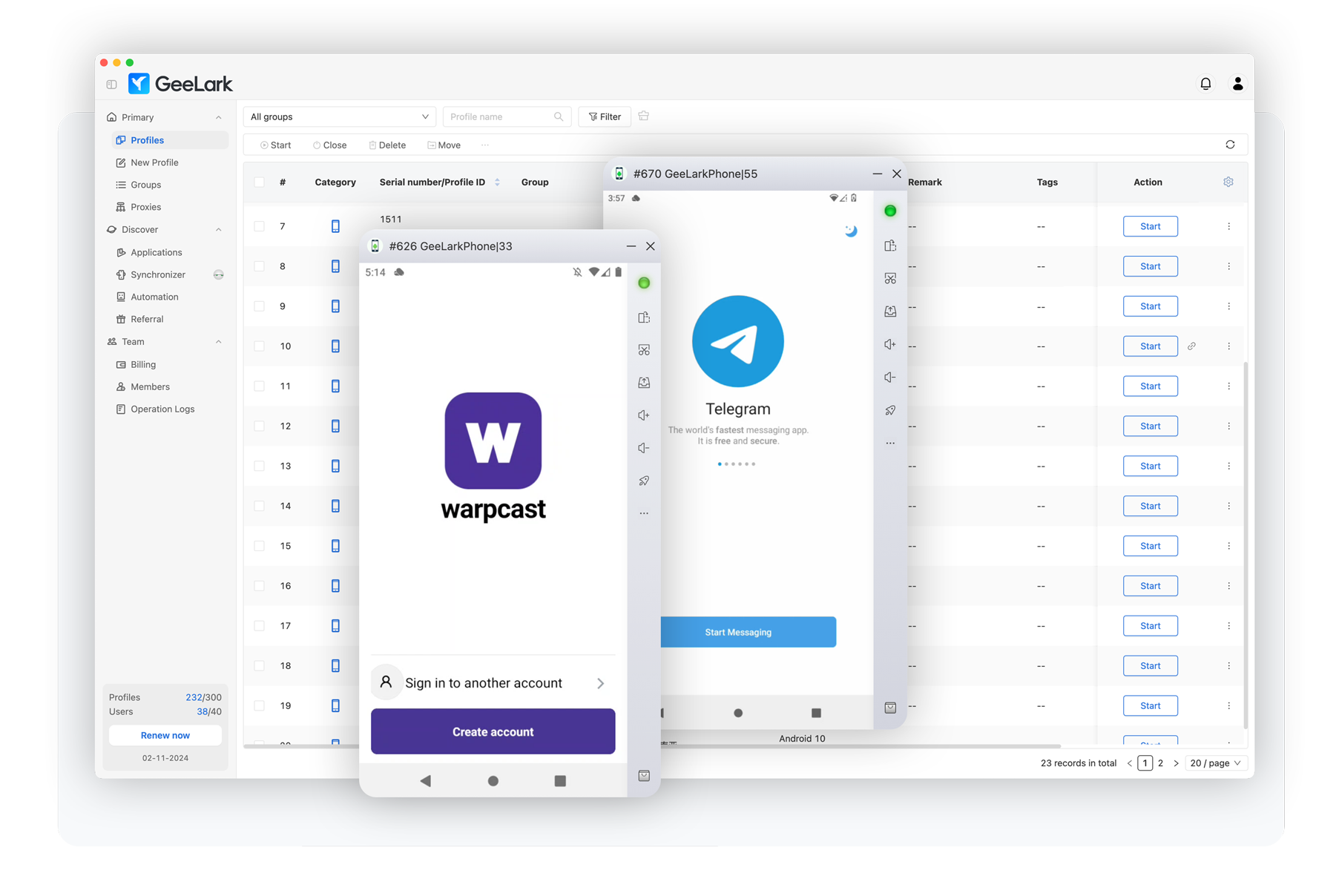
- Geelark - Popular cloud phone service that excels at running native mobile apps. Browser fingerprints are less unique so focus on app-based operations.
- MoreLogin Cloud Phone - Similar to Geelark with native app support. Both services share browser fingerprints making app usage the optimal approach.
- AWS Device Farm - Enterprise-grade device cloud with extensive app testing capabilities. Requires technical expertise but offers unmatched device variety.
- Browser Stacks Real Device Cloud - Another enterprise solution focused on app testing. Complex setup but provides genuine device access for native applications.
How Are They Effective?
Think about why iPhones work so well as we discussed previously - they blend in perfectly with normal traffic. Mobile antidetects operate on the exact same principle. When youre remotely controlling a popular phone configuration (using app instead of browser) you become just another face in the crowd - completely indistinguishable from thousands of regular users. The antifraud systems cant flag you because your device signature matches what they expect to see from legitimate customers.
The real magic happens with native apps. While PayPal Cash App banking sites and booking sites have transformed their websites into impenetrable fortresses with advanced fingerprinting that makes browser antidetects obsolete their mobile apps remain far more vulnerable. The native app environment simply doesnt have the same level of sophisticated detection.
Since youre not touching the browser at all you completely sidestep the fingerprinting arms race. Traditional antidetects can spoof all they want but theyll never match real hardware. Cloud phones give you legitimacy because youre controlling genuine physical devices and sticking to native apps - no browser fingerprinting to worry about.
View attachment 6552
When you fire up a mobile antidetect youre getting direct access to install and run apps exactly like a normal phone. No more wrestling with browser detection - youre using the apps exactly as they were designed to be used. Your device looks legitimate because it actually is legitimate hardware making it virtually impossible for apps to distinguish between your session and any other users phone.
Best Practices
* Hidden text: cannot be quoted. *
Lets talk device selection. For GeeLark and Cloud Phone just pick the most updated configuration - they manage the device specs for optimal performance. On AWS farm the Samsungs and Popular Chinese Phones are perfect - they disappear into the crowd of normal users. Some obscure nobody-uses phones like Xperia or LG? Wont work for long as you will be correlated sooner or later.
View attachment 6553
View attachment 6554
Your OS version needs to match what regular people are running. Most users update their phones pretty quickly these days but theres always a sweet spot - about 2-3 months behind the latest release. Thats where you want to be to perfectly blend in.
Now for a mistake I see constantly: fucking with system settings. Every time you toggle some obscure Android setting or tweak a system parameter youre making your device stick out like a sore thumb. Default is beautiful. Default is safe. The more your setup looks like it came straight out of the box the better.
Your proxy setup has to make sense too. The whole point of using mobile antidetects is looking legitimate so dont ruin it with mismatched data. Always use MOBILE PROXIES. If your IP says youre in Nebraska but your carrier info shows T-Mobile Miami youve just wasted all that effort on device authenticity.

Lastly heres what makes these services truly powerful - they run on per-minute billing. This means you can treat devices like burner phones switching them out constantly. Orders getting cancelled left and right? Generate a new one. Something feels off? Switch it up. Fresh devices mean fresh fingerprints and that constant rotation keeps you one step ahead.
Mobile Antidetects: Not Quite There Yet
Lets be real - mobile antidetects show promise but theyre not the shit yet. While running real hardware with native apps is a step forward from browser-based bullshit they still cant match the reliability of a properly configured iPhone especially when it comes to using the browser to card stuff.
The technology itself is solid - spinning up fresh devices on demand and running native apps does give you legitimacy. But dont get caught up in the hype. Browser operations are still sketchy as fuck with shared fingerprints and youre limited to specific apps that work well with these services.
For now keep your iPhone as your primary and use mobile antidetects as a supplementary tool where they make sense - specific apps testing configurations or when you need quick rotation. And remember - even with real hardware being sloppy with OPSEC will still get you burned. Match those proxies stick to stock settings and stay paranoid. The antifraud game never sleeps. d0ctrine out.
Good
Our iPhone guide showed how mobile devices are goldmines for carding - they blend in seamlessly with normal traffic and slip past antifraud like a ghost. But what if youre broke as fuck or just hate Apples overpriced bullshit? Dont worry theres another option thats been gaining serious traction: mobile antidetects. These services are revolutionizing the game by giving you access to real physical devices without dropping thousands on hardware. And unlike traditional antidetects that just pretend to be phones this shit actually works because youre controlling genuine mobile devices remotely.
Lets be crystal clear about what were discussing here because theres a lot of bullshit floating around about mobile antidetects. First lets eliminate what were NOT talking about:
What we ARE talking about is new technology: services that give you direct remote access to REAL physical phones sitting in datacenters. These arent emulators or virtual machines - theyre actual smartphones you can control through the cloud.
- Mobile browsers with built-in antidetect features (like "private" or "mimic" modes) - This is unreliable garbage that still leaks your real device info through WebRTC canvas fingerprinting and sensor data.
- Traditional antidetects like AdsPower Dolphin or GoLogin pretending to be phones - Pure garbage that gets flagged instantly. Their mobile emulation is a joke - wrong screen ratios broken sensors and fingerprints that gets flagged by half-decent antifraud system.
- Android emulators with spoofing tools - Dont even get me started on this. If youre using Nox or BlueStacks for work you deserve to get caught.
The major players in this space are:
- Geelark - Popular cloud phone service that excels at running native mobile apps. Browser fingerprints are less unique so focus on app-based operations.
- MoreLogin Cloud Phone - Similar to Geelark with native app support. Both services share browser fingerprints making app usage the optimal approach.
- AWS Device Farm - Enterprise-grade device cloud with extensive app testing capabilities. Requires technical expertise but offers unmatched device variety.
- Browser Stacks Real Device Cloud - Another enterprise solution focused on app testing. Complex setup but provides genuine device access for native applications.
How Are They Effective?
Think about why iPhones work so well as we discussed previously - they blend in perfectly with normal traffic. Mobile antidetects operate on the exact same principle. When youre remotely controlling a popular phone configuration (using app instead of browser) you become just another face in the crowd - completely indistinguishable from thousands of regular users. The antifraud systems cant flag you because your device signature matches what they expect to see from legitimate customers.
The real magic happens with native apps. While PayPal Cash App banking sites and booking sites have transformed their websites into impenetrable fortresses with advanced fingerprinting that makes browser antidetects obsolete their mobile apps remain far more vulnerable. The native app environment simply doesnt have the same level of sophisticated detection.
Since youre not touching the browser at all you completely sidestep the fingerprinting arms race. Traditional antidetects can spoof all they want but theyll never match real hardware. Cloud phones give you legitimacy because youre controlling genuine physical devices and sticking to native apps - no browser fingerprinting to worry about.
View attachment 6552
When you fire up a mobile antidetect youre getting direct access to install and run apps exactly like a normal phone. No more wrestling with browser detection - youre using the apps exactly as they were designed to be used. Your device looks legitimate because it actually is legitimate hardware making it virtually impossible for apps to distinguish between your session and any other users phone.
Best Practices
* Hidden text: cannot be quoted. *
Lets talk device selection. For GeeLark and Cloud Phone just pick the most updated configuration - they manage the device specs for optimal performance. On AWS farm the Samsungs and Popular Chinese Phones are perfect - they disappear into the crowd of normal users. Some obscure nobody-uses phones like Xperia or LG? Wont work for long as you will be correlated sooner or later.
View attachment 6553
View attachment 6554
Your OS version needs to match what regular people are running. Most users update their phones pretty quickly these days but theres always a sweet spot - about 2-3 months behind the latest release. Thats where you want to be to perfectly blend in.
Now for a mistake I see constantly: fucking with system settings. Every time you toggle some obscure Android setting or tweak a system parameter youre making your device stick out like a sore thumb. Default is beautiful. Default is safe. The more your setup looks like it came straight out of the box the better.
Your proxy setup has to make sense too. The whole point of using mobile antidetects is looking legitimate so dont ruin it with mismatched data. Always use MOBILE PROXIES. If your IP says youre in Nebraska but your carrier info shows T-Mobile Miami youve just wasted all that effort on device authenticity.
Lastly heres what makes these services truly powerful - they run on per-minute billing. This means you can treat devices like burner phones switching them out constantly. Orders getting cancelled left and right? Generate a new one. Something feels off? Switch it up. Fresh devices mean fresh fingerprints and that constant rotation keeps you one step ahead.
Mobile Antidetects: Not Quite There Yet
Lets be real - mobile antidetects show promise but theyre not the shit yet. While running real hardware with native apps is a step forward from browser-based bullshit they still cant match the reliability of a properly configured iPhone especially when it comes to using the browser to card stuff.
The technology itself is solid - spinning up fresh devices on demand and running native apps does give you legitimacy. But dont get caught up in the hype. Browser operations are still sketchy as fuck with shared fingerprints and youre limited to specific apps that work well with these services.
For now keep your iPhone as your primary and use mobile antidetects as a supplementary tool where they make sense - specific apps testing configurations or when you need quick rotation. And remember - even with real hardware being sloppy with OPSEC will still get you burned. Match those proxies stick to stock settings and stay paranoid. The antifraud game never sleeps. d0ctrine out.
Our iPhone guide showed how mobile devices are goldmines for carding - they blend in seamlessly with normal traffic and slip past antifraud like a ghost. But what if youre broke as fuck or just hate Apples overpriced bullshit? Dont worry theres another option thats been gaining serious traction: mobile antidetects. These services are revolutionizing the game by giving you access to real physical devices without dropping thousands on hardware. And unlike traditional antidetects that just pretend to be phones this shit actually works because youre controlling genuine mobile devices remotely.
Lets be crystal clear about what were discussing here because theres a lot of bullshit floating around about mobile antidetects. First lets eliminate what were NOT talking about:
What we ARE talking about is new technology: services that give you direct remote access to REAL physical phones sitting in datacenters. These arent emulators or virtual machines - theyre actual smartphones you can control through the cloud.
- Mobile browsers with built-in antidetect features (like "private" or "mimic" modes) - This is unreliable garbage that still leaks your real device info through WebRTC canvas fingerprinting and sensor data.
- Traditional antidetects like AdsPower Dolphin or GoLogin pretending to be phones - Pure garbage that gets flagged instantly. Their mobile emulation is a joke - wrong screen ratios broken sensors and fingerprints that gets flagged by half-decent antifraud system.
- Android emulators with spoofing tools - Dont even get me started on this. If youre using Nox or BlueStacks for work you deserve to get caught.
The major players in this space are:
- Geelark - Popular cloud phone service that excels at running native mobile apps. Browser fingerprints are less unique so focus on app-based operations.
- MoreLogin Cloud Phone - Similar to Geelark with native app support. Both services share browser fingerprints making app usage the optimal approach.
- AWS Device Farm - Enterprise-grade device cloud with extensive app testing capabilities. Requires technical expertise but offers unmatched device variety.
- Browser Stacks Real Device Cloud - Another enterprise solution focused on app testing. Complex setup but provides genuine device access for native applications.
How Are They Effective?
Think about why iPhones work so well as we discussed previously - they blend in perfectly with normal traffic. Mobile antidetects operate on the exact same principle. When youre remotely controlling a popular phone configuration (using app instead of browser) you become just another face in the crowd - completely indistinguishable from thousands of regular users. The antifraud systems cant flag you because your device signature matches what they expect to see from legitimate customers.
The real magic happens with native apps. While PayPal Cash App banking sites and booking sites have transformed their websites into impenetrable fortresses with advanced fingerprinting that makes browser antidetects obsolete their mobile apps remain far more vulnerable. The native app environment simply doesnt have the same level of sophisticated detection.
Since youre not touching the browser at all you completely sidestep the fingerprinting arms race. Traditional antidetects can spoof all they want but theyll never match real hardware. Cloud phones give you legitimacy because youre controlling genuine physical devices and sticking to native apps - no browser fingerprinting to worry about.
View attachment 6552
When you fire up a mobile antidetect youre getting direct access to install and run apps exactly like a normal phone. No more wrestling with browser detection - youre using the apps exactly as they were designed to be used. Your device looks legitimate because it actually is legitimate hardware making it virtually impossible for apps to distinguish between your session and any other users phone.
Best Practices
* Hidden text: cannot be quoted. *
Lets talk device selection. For GeeLark and Cloud Phone just pick the most updated configuration - they manage the device specs for optimal performance. On AWS farm the Samsungs and Popular Chinese Phones are perfect - they disappear into the crowd of normal users. Some obscure nobody-uses phones like Xperia or LG? Wont work for long as you will be correlated sooner or later.
View attachment 6553
View attachment 6554
Your OS version needs to match what regular people are running. Most users update their phones pretty quickly these days but theres always a sweet spot - about 2-3 months behind the latest release. Thats where you want to be to perfectly blend in.
Now for a mistake I see constantly: fucking with system settings. Every time you toggle some obscure Android setting or tweak a system parameter youre making your device stick out like a sore thumb. Default is beautiful. Default is safe. The more your setup looks like it came straight out of the box the better.
Your proxy setup has to make sense too. The whole point of using mobile antidetects is looking legitimate so dont ruin it with mismatched data. Always use MOBILE PROXIES. If your IP says youre in Nebraska but your carrier info shows T-Mobile Miami youve just wasted all that effort on device authenticity.
Lastly heres what makes these services truly powerful - they run on per-minute billing. This means you can treat devices like burner phones switching them out constantly. Orders getting cancelled left and right? Generate a new one. Something feels off? Switch it up. Fresh devices mean fresh fingerprints and that constant rotation keeps you one step ahead.
Mobile Antidetects: Not Quite There Yet
Lets be real - mobile antidetects show promise but theyre not the shit yet. While running real hardware with native apps is a step forward from browser-based bullshit they still cant match the reliability of a properly configured iPhone especially when it comes to using the browser to card stuff.
The technology itself is solid - spinning up fresh devices on demand and running native apps does give you legitimacy. But dont get caught up in the hype. Browser operations are still sketchy as fuck with shared fingerprints and youre limited to specific apps that work well with these services.
For now keep your iPhone as your primary and use mobile antidetects as a supplementary tool where they make sense - specific apps testing configurations or when you need quick rotation. And remember - even with real hardware being sloppy with OPSEC will still get you burned. Match those proxies stick to stock settings and stay paranoid. The antifraud game never sleeps. d0ctrine out.
UnbridleDeafnessLubricate
Newbie
- Joined
- 08.11.25
- Messages
- 1
- Reaction score
- 0
- Points
- 1
top notch

hanien_8324
Newbie
- Joined
- 16.03.24
- Messages
- 36
- Reaction score
- 3
- Points
- 8
Best Practices, sir
Our iPhone guide showed how mobile devices are goldmines for carding - they blend in seamlessly with normal traffic and slip past antifraud like a ghost. But what if youre broke as fuck or just hate Apples overpriced bullshit? Dont worry theres another option thats been gaining serious traction: mobile antidetects. These services are revolutionizing the game by giving you access to real physical devices without dropping thousands on hardware. And unlike traditional antidetects that just pretend to be phones this shit actually works because youre controlling genuine mobile devices remotely.
Lets be crystal clear about what were discussing here because theres a lot of bullshit floating around about mobile antidetects. First lets eliminate what were NOT talking about:
What we ARE talking about is new technology: services that give you direct remote access to REAL physical phones sitting in datacenters. These arent emulators or virtual machines - theyre actual smartphones you can control through the cloud.
- Mobile browsers with built-in antidetect features (like "private" or "mimic" modes) - This is unreliable garbage that still leaks your real device info through WebRTC canvas fingerprinting and sensor data.
- Traditional antidetects like AdsPower Dolphin or GoLogin pretending to be phones - Pure garbage that gets flagged instantly. Their mobile emulation is a joke - wrong screen ratios broken sensors and fingerprints that gets flagged by half-decent antifraud system.
- Android emulators with spoofing tools - Dont even get me started on this. If youre using Nox or BlueStacks for work you deserve to get caught.
The major players in this space are:
- Geelark - Popular cloud phone service that excels at running native mobile apps. Browser fingerprints are less unique so focus on app-based operations.
- MoreLogin Cloud Phone - Similar to Geelark with native app support. Both services share browser fingerprints making app usage the optimal approach.
- AWS Device Farm - Enterprise-grade device cloud with extensive app testing capabilities. Requires technical expertise but offers unmatched device variety.
- Browser Stacks Real Device Cloud - Another enterprise solution focused on app testing. Complex setup but provides genuine device access for native applications.
How Are They Effective?
Think about why iPhones work so well as we discussed previously - they blend in perfectly with normal traffic. Mobile antidetects operate on the exact same principle. When youre remotely controlling a popular phone configuration (using app instead of browser) you become just another face in the crowd - completely indistinguishable from thousands of regular users. The antifraud systems cant flag you because your device signature matches what they expect to see from legitimate customers.
The real magic happens with native apps. While PayPal Cash App banking sites and booking sites have transformed their websites into impenetrable fortresses with advanced fingerprinting that makes browser antidetects obsolete their mobile apps remain far more vulnerable. The native app environment simply doesnt have the same level of sophisticated detection.
Since youre not touching the browser at all you completely sidestep the fingerprinting arms race. Traditional antidetects can spoof all they want but theyll never match real hardware. Cloud phones give you legitimacy because youre controlling genuine physical devices and sticking to native apps - no browser fingerprinting to worry about.
View attachment 6552
When you fire up a mobile antidetect youre getting direct access to install and run apps exactly like a normal phone. No more wrestling with browser detection - youre using the apps exactly as they were designed to be used. Your device looks legitimate because it actually is legitimate hardware making it virtually impossible for apps to distinguish between your session and any other users phone.
Best Practices
* Hidden text: cannot be quoted. *
Lets talk device selection. For GeeLark and Cloud Phone just pick the most updated configuration - they manage the device specs for optimal performance. On AWS farm the Samsungs and Popular Chinese Phones are perfect - they disappear into the crowd of normal users. Some obscure nobody-uses phones like Xperia or LG? Wont work for long as you will be correlated sooner or later.
View attachment 6553
View attachment 6554
Your OS version needs to match what regular people are running. Most users update their phones pretty quickly these days but theres always a sweet spot - about 2-3 months behind the latest release. Thats where you want to be to perfectly blend in.
Now for a mistake I see constantly: fucking with system settings. Every time you toggle some obscure Android setting or tweak a system parameter youre making your device stick out like a sore thumb. Default is beautiful. Default is safe. The more your setup looks like it came straight out of the box the better.
Your proxy setup has to make sense too. The whole point of using mobile antidetects is looking legitimate so dont ruin it with mismatched data. Always use MOBILE PROXIES. If your IP says youre in Nebraska but your carrier info shows T-Mobile Miami youve just wasted all that effort on device authenticity.
Lastly heres what makes these services truly powerful - they run on per-minute billing. This means you can treat devices like burner phones switching them out constantly. Orders getting cancelled left and right? Generate a new one. Something feels off? Switch it up. Fresh devices mean fresh fingerprints and that constant rotation keeps you one step ahead.
Mobile Antidetects: Not Quite There Yet
Lets be real - mobile antidetects show promise but theyre not the shit yet. While running real hardware with native apps is a step forward from browser-based bullshit they still cant match the reliability of a properly configured iPhone especially when it comes to using the browser to card stuff.
The technology itself is solid - spinning up fresh devices on demand and running native apps does give you legitimacy. But dont get caught up in the hype. Browser operations are still sketchy as fuck with shared fingerprints and youre limited to specific apps that work well with these services.
For now keep your iPhone as your primary and use mobile antidetects as a supplementary tool where they make sense - specific apps testing configurations or when you need quick rotation. And remember - even with real hardware being sloppy with OPSEC will still get you burned. Match those proxies stick to stock settings and stay paranoid. The antifraud game never sleeps. d0ctrine out.
I_AM_ZILLION_DOLLAR_BABY
Newbie
- Joined
- 27.11.25
- Messages
- 1
- Reaction score
- 0
- Points
- 1
Good
Our iPhone guide showed how mobile devices are goldmines for carding - they blend in seamlessly with normal traffic and slip past antifraud like a ghost. But what if youre broke as fuck or just hate Apples overpriced bullshit? Dont worry theres another option thats been gaining serious traction: mobile antidetects. These services are revolutionizing the game by giving you access to real physical devices without dropping thousands on hardware. And unlike traditional antidetects that just pretend to be phones this shit actually works because youre controlling genuine mobile devices remotely.
Lets be crystal clear about what were discussing here because theres a lot of bullshit floating around about mobile antidetects. First lets eliminate what were NOT talking about:
What we ARE talking about is new technology: services that give you direct remote access to REAL physical phones sitting in datacenters. These arent emulators or virtual machines - theyre actual smartphones you can control through the cloud.
- Mobile browsers with built-in antidetect features (like "private" or "mimic" modes) - This is unreliable garbage that still leaks your real device info through WebRTC canvas fingerprinting and sensor data.
- Traditional antidetects like AdsPower Dolphin or GoLogin pretending to be phones - Pure garbage that gets flagged instantly. Their mobile emulation is a joke - wrong screen ratios broken sensors and fingerprints that gets flagged by half-decent antifraud system.
- Android emulators with spoofing tools - Dont even get me started on this. If youre using Nox or BlueStacks for work you deserve to get caught.
The major players in this space are:
- Geelark - Popular cloud phone service that excels at running native mobile apps. Browser fingerprints are less unique so focus on app-based operations.
- MoreLogin Cloud Phone - Similar to Geelark with native app support. Both services share browser fingerprints making app usage the optimal approach.
- AWS Device Farm - Enterprise-grade device cloud with extensive app testing capabilities. Requires technical expertise but offers unmatched device variety.
- Browser Stacks Real Device Cloud - Another enterprise solution focused on app testing. Complex setup but provides genuine device access for native applications.
How Are They Effective?
Think about why iPhones work so well as we discussed previously - they blend in perfectly with normal traffic. Mobile antidetects operate on the exact same principle. When youre remotely controlling a popular phone configuration (using app instead of browser) you become just another face in the crowd - completely indistinguishable from thousands of regular users. The antifraud systems cant flag you because your device signature matches what they expect to see from legitimate customers.
The real magic happens with native apps. While PayPal Cash App banking sites and booking sites have transformed their websites into impenetrable fortresses with advanced fingerprinting that makes browser antidetects obsolete their mobile apps remain far more vulnerable. The native app environment simply doesnt have the same level of sophisticated detection.
Since youre not touching the browser at all you completely sidestep the fingerprinting arms race. Traditional antidetects can spoof all they want but theyll never match real hardware. Cloud phones give you legitimacy because youre controlling genuine physical devices and sticking to native apps - no browser fingerprinting to worry about.
View attachment 6552
When you fire up a mobile antidetect youre getting direct access to install and run apps exactly like a normal phone. No more wrestling with browser detection - youre using the apps exactly as they were designed to be used. Your device looks legitimate because it actually is legitimate hardware making it virtually impossible for apps to distinguish between your session and any other users phone.
Best Practices
* Hidden text: cannot be quoted. *
Lets talk device selection. For GeeLark and Cloud Phone just pick the most updated configuration - they manage the device specs for optimal performance. On AWS farm the Samsungs and Popular Chinese Phones are perfect - they disappear into the crowd of normal users. Some obscure nobody-uses phones like Xperia or LG? Wont work for long as you will be correlated sooner or later.
View attachment 6553
View attachment 6554
Your OS version needs to match what regular people are running. Most users update their phones pretty quickly these days but theres always a sweet spot - about 2-3 months behind the latest release. Thats where you want to be to perfectly blend in.
Now for a mistake I see constantly: fucking with system settings. Every time you toggle some obscure Android setting or tweak a system parameter youre making your device stick out like a sore thumb. Default is beautiful. Default is safe. The more your setup looks like it came straight out of the box the better.
Your proxy setup has to make sense too. The whole point of using mobile antidetects is looking legitimate so dont ruin it with mismatched data. Always use MOBILE PROXIES. If your IP says youre in Nebraska but your carrier info shows T-Mobile Miami youve just wasted all that effort on device authenticity.
Lastly heres what makes these services truly powerful - they run on per-minute billing. This means you can treat devices like burner phones switching them out constantly. Orders getting cancelled left and right? Generate a new one. Something feels off? Switch it up. Fresh devices mean fresh fingerprints and that constant rotation keeps you one step ahead.
Mobile Antidetects: Not Quite There Yet
Lets be real - mobile antidetects show promise but theyre not the shit yet. While running real hardware with native apps is a step forward from browser-based bullshit they still cant match the reliability of a properly configured iPhone especially when it comes to using the browser to card stuff.
The technology itself is solid - spinning up fresh devices on demand and running native apps does give you legitimacy. But dont get caught up in the hype. Browser operations are still sketchy as fuck with shared fingerprints and youre limited to specific apps that work well with these services.
For now keep your iPhone as your primary and use mobile antidetects as a supplementary tool where they make sense - specific apps testing configurations or when you need quick rotation. And remember - even with real hardware being sloppy with OPSEC will still get you burned. Match those proxies stick to stock settings and stay paranoid. The antifraud game never sleeps. d0ctrine out.
Hail doc!
Our iPhone guide showed how mobile devices are goldmines for carding - they blend in seamlessly with normal traffic and slip past antifraud like a ghost. But what if youre broke as fuck or just hate Apples overpriced bullshit? Dont worry theres another option thats been gaining serious traction: mobile antidetects. These services are revolutionizing the game by giving you access to real physical devices without dropping thousands on hardware. And unlike traditional antidetects that just pretend to be phones this shit actually works because youre controlling genuine mobile devices remotely.
Lets be crystal clear about what were discussing here because theres a lot of bullshit floating around about mobile antidetects. First lets eliminate what were NOT talking about:
What we ARE talking about is new technology: services that give you direct remote access to REAL physical phones sitting in datacenters. These arent emulators or virtual machines - theyre actual smartphones you can control through the cloud.
- Mobile browsers with built-in antidetect features (like "private" or "mimic" modes) - This is unreliable garbage that still leaks your real device info through WebRTC canvas fingerprinting and sensor data.
- Traditional antidetects like AdsPower Dolphin or GoLogin pretending to be phones - Pure garbage that gets flagged instantly. Their mobile emulation is a joke - wrong screen ratios broken sensors and fingerprints that gets flagged by half-decent antifraud system.
- Android emulators with spoofing tools - Dont even get me started on this. If youre using Nox or BlueStacks for work you deserve to get caught.
The major players in this space are:
- Geelark - Popular cloud phone service that excels at running native mobile apps. Browser fingerprints are less unique so focus on app-based operations.
- MoreLogin Cloud Phone - Similar to Geelark with native app support. Both services share browser fingerprints making app usage the optimal approach.
- AWS Device Farm - Enterprise-grade device cloud with extensive app testing capabilities. Requires technical expertise but offers unmatched device variety.
- Browser Stacks Real Device Cloud - Another enterprise solution focused on app testing. Complex setup but provides genuine device access for native applications.
How Are They Effective?
Think about why iPhones work so well as we discussed previously - they blend in perfectly with normal traffic. Mobile antidetects operate on the exact same principle. When youre remotely controlling a popular phone configuration (using app instead of browser) you become just another face in the crowd - completely indistinguishable from thousands of regular users. The antifraud systems cant flag you because your device signature matches what they expect to see from legitimate customers.
The real magic happens with native apps. While PayPal Cash App banking sites and booking sites have transformed their websites into impenetrable fortresses with advanced fingerprinting that makes browser antidetects obsolete their mobile apps remain far more vulnerable. The native app environment simply doesnt have the same level of sophisticated detection.
Since youre not touching the browser at all you completely sidestep the fingerprinting arms race. Traditional antidetects can spoof all they want but theyll never match real hardware. Cloud phones give you legitimacy because youre controlling genuine physical devices and sticking to native apps - no browser fingerprinting to worry about.
View attachment 6552
When you fire up a mobile antidetect youre getting direct access to install and run apps exactly like a normal phone. No more wrestling with browser detection - youre using the apps exactly as they were designed to be used. Your device looks legitimate because it actually is legitimate hardware making it virtually impossible for apps to distinguish between your session and any other users phone.
Best Practices
* Hidden text: cannot be quoted. *
Lets talk device selection. For GeeLark and Cloud Phone just pick the most updated configuration - they manage the device specs for optimal performance. On AWS farm the Samsungs and Popular Chinese Phones are perfect - they disappear into the crowd of normal users. Some obscure nobody-uses phones like Xperia or LG? Wont work for long as you will be correlated sooner or later.
View attachment 6553
View attachment 6554
Your OS version needs to match what regular people are running. Most users update their phones pretty quickly these days but theres always a sweet spot - about 2-3 months behind the latest release. Thats where you want to be to perfectly blend in.
Now for a mistake I see constantly: fucking with system settings. Every time you toggle some obscure Android setting or tweak a system parameter youre making your device stick out like a sore thumb. Default is beautiful. Default is safe. The more your setup looks like it came straight out of the box the better.
Your proxy setup has to make sense too. The whole point of using mobile antidetects is looking legitimate so dont ruin it with mismatched data. Always use MOBILE PROXIES. If your IP says youre in Nebraska but your carrier info shows T-Mobile Miami youve just wasted all that effort on device authenticity.
Lastly heres what makes these services truly powerful - they run on per-minute billing. This means you can treat devices like burner phones switching them out constantly. Orders getting cancelled left and right? Generate a new one. Something feels off? Switch it up. Fresh devices mean fresh fingerprints and that constant rotation keeps you one step ahead.
Mobile Antidetects: Not Quite There Yet
Lets be real - mobile antidetects show promise but theyre not the shit yet. While running real hardware with native apps is a step forward from browser-based bullshit they still cant match the reliability of a properly configured iPhone especially when it comes to using the browser to card stuff.
The technology itself is solid - spinning up fresh devices on demand and running native apps does give you legitimacy. But dont get caught up in the hype. Browser operations are still sketchy as fuck with shared fingerprints and youre limited to specific apps that work well with these services.
For now keep your iPhone as your primary and use mobile antidetects as a supplementary tool where they make sense - specific apps testing configurations or when you need quick rotation. And remember - even with real hardware being sloppy with OPSEC will still get you burned. Match those proxies stick to stock settings and stay paranoid. The antifraud game never sleeps. d0ctrine out.
thanks doc
Our iPhone guide showed how mobile devices are goldmines for carding - they blend in seamlessly with normal traffic and slip past antifraud like a ghost. But what if youre broke as fuck or just hate Apples overpriced bullshit? Dont worry theres another option thats been gaining serious traction: mobile antidetects. These services are revolutionizing the game by giving you access to real physical devices without dropping thousands on hardware. And unlike traditional antidetects that just pretend to be phones this shit actually works because youre controlling genuine mobile devices remotely.
Lets be crystal clear about what were discussing here because theres a lot of bullshit floating around about mobile antidetects. First lets eliminate what were NOT talking about:
What we ARE talking about is new technology: services that give you direct remote access to REAL physical phones sitting in datacenters. These arent emulators or virtual machines - theyre actual smartphones you can control through the cloud.
- Mobile browsers with built-in antidetect features (like "private" or "mimic" modes) - This is unreliable garbage that still leaks your real device info through WebRTC canvas fingerprinting and sensor data.
- Traditional antidetects like AdsPower Dolphin or GoLogin pretending to be phones - Pure garbage that gets flagged instantly. Their mobile emulation is a joke - wrong screen ratios broken sensors and fingerprints that gets flagged by half-decent antifraud system.
- Android emulators with spoofing tools - Dont even get me started on this. If youre using Nox or BlueStacks for work you deserve to get caught.
The major players in this space are:
- Geelark - Popular cloud phone service that excels at running native mobile apps. Browser fingerprints are less unique so focus on app-based operations.
- MoreLogin Cloud Phone - Similar to Geelark with native app support. Both services share browser fingerprints making app usage the optimal approach.
- AWS Device Farm - Enterprise-grade device cloud with extensive app testing capabilities. Requires technical expertise but offers unmatched device variety.
- Browser Stacks Real Device Cloud - Another enterprise solution focused on app testing. Complex setup but provides genuine device access for native applications.
How Are They Effective?
Think about why iPhones work so well as we discussed previously - they blend in perfectly with normal traffic. Mobile antidetects operate on the exact same principle. When youre remotely controlling a popular phone configuration (using app instead of browser) you become just another face in the crowd - completely indistinguishable from thousands of regular users. The antifraud systems cant flag you because your device signature matches what they expect to see from legitimate customers.
The real magic happens with native apps. While PayPal Cash App banking sites and booking sites have transformed their websites into impenetrable fortresses with advanced fingerprinting that makes browser antidetects obsolete their mobile apps remain far more vulnerable. The native app environment simply doesnt have the same level of sophisticated detection.
Since youre not touching the browser at all you completely sidestep the fingerprinting arms race. Traditional antidetects can spoof all they want but theyll never match real hardware. Cloud phones give you legitimacy because youre controlling genuine physical devices and sticking to native apps - no browser fingerprinting to worry about.
View attachment 6552
When you fire up a mobile antidetect youre getting direct access to install and run apps exactly like a normal phone. No more wrestling with browser detection - youre using the apps exactly as they were designed to be used. Your device looks legitimate because it actually is legitimate hardware making it virtually impossible for apps to distinguish between your session and any other users phone.
Best Practices
* Hidden text: cannot be quoted. *
Lets talk device selection. For GeeLark and Cloud Phone just pick the most updated configuration - they manage the device specs for optimal performance. On AWS farm the Samsungs and Popular Chinese Phones are perfect - they disappear into the crowd of normal users. Some obscure nobody-uses phones like Xperia or LG? Wont work for long as you will be correlated sooner or later.
View attachment 6553
View attachment 6554
Your OS version needs to match what regular people are running. Most users update their phones pretty quickly these days but theres always a sweet spot - about 2-3 months behind the latest release. Thats where you want to be to perfectly blend in.
Now for a mistake I see constantly: fucking with system settings. Every time you toggle some obscure Android setting or tweak a system parameter youre making your device stick out like a sore thumb. Default is beautiful. Default is safe. The more your setup looks like it came straight out of the box the better.
Your proxy setup has to make sense too. The whole point of using mobile antidetects is looking legitimate so dont ruin it with mismatched data. Always use MOBILE PROXIES. If your IP says youre in Nebraska but your carrier info shows T-Mobile Miami youve just wasted all that effort on device authenticity.
Lastly heres what makes these services truly powerful - they run on per-minute billing. This means you can treat devices like burner phones switching them out constantly. Orders getting cancelled left and right? Generate a new one. Something feels off? Switch it up. Fresh devices mean fresh fingerprints and that constant rotation keeps you one step ahead.
Mobile Antidetects: Not Quite There Yet
Lets be real - mobile antidetects show promise but theyre not the shit yet. While running real hardware with native apps is a step forward from browser-based bullshit they still cant match the reliability of a properly configured iPhone especially when it comes to using the browser to card stuff.
The technology itself is solid - spinning up fresh devices on demand and running native apps does give you legitimacy. But dont get caught up in the hype. Browser operations are still sketchy as fuck with shared fingerprints and youre limited to specific apps that work well with these services.
For now keep your iPhone as your primary and use mobile antidetects as a supplementary tool where they make sense - specific apps testing configurations or when you need quick rotation. And remember - even with real hardware being sloppy with OPSEC will still get you burned. Match those proxies stick to stock settings and stay paranoid. The antifraud game never sleeps. d0ctrine out.
tatosac523
Newbie
- Joined
- 11.12.25
- Messages
- 18
- Reaction score
- 1
- Points
- 3
thx
Our iPhone guide showed how mobile devices are goldmines for carding - they blend in seamlessly with normal traffic and slip past antifraud like a ghost. But what if youre broke as fuck or just hate Apples overpriced bullshit? Dont worry theres another option thats been gaining serious traction: mobile antidetects. These services are revolutionizing the game by giving you access to real physical devices without dropping thousands on hardware. And unlike traditional antidetects that just pretend to be phones this shit actually works because youre controlling genuine mobile devices remotely.
Lets be crystal clear about what were discussing here because theres a lot of bullshit floating around about mobile antidetects. First lets eliminate what were NOT talking about:
What we ARE talking about is new technology: services that give you direct remote access to REAL physical phones sitting in datacenters. These arent emulators or virtual machines - theyre actual smartphones you can control through the cloud.
- Mobile browsers with built-in antidetect features (like "private" or "mimic" modes) - This is unreliable garbage that still leaks your real device info through WebRTC canvas fingerprinting and sensor data.
- Traditional antidetects like AdsPower Dolphin or GoLogin pretending to be phones - Pure garbage that gets flagged instantly. Their mobile emulation is a joke - wrong screen ratios broken sensors and fingerprints that gets flagged by half-decent antifraud system.
- Android emulators with spoofing tools - Dont even get me started on this. If youre using Nox or BlueStacks for work you deserve to get caught.
The major players in this space are:
- Geelark - Popular cloud phone service that excels at running native mobile apps. Browser fingerprints are less unique so focus on app-based operations.
- MoreLogin Cloud Phone - Similar to Geelark with native app support. Both services share browser fingerprints making app usage the optimal approach.
- AWS Device Farm - Enterprise-grade device cloud with extensive app testing capabilities. Requires technical expertise but offers unmatched device variety.
- Browser Stacks Real Device Cloud - Another enterprise solution focused on app testing. Complex setup but provides genuine device access for native applications.
How Are They Effective?
Think about why iPhones work so well as we discussed previously - they blend in perfectly with normal traffic. Mobile antidetects operate on the exact same principle. When youre remotely controlling a popular phone configuration (using app instead of browser) you become just another face in the crowd - completely indistinguishable from thousands of regular users. The antifraud systems cant flag you because your device signature matches what they expect to see from legitimate customers.
The real magic happens with native apps. While PayPal Cash App banking sites and booking sites have transformed their websites into impenetrable fortresses with advanced fingerprinting that makes browser antidetects obsolete their mobile apps remain far more vulnerable. The native app environment simply doesnt have the same level of sophisticated detection.
Since youre not touching the browser at all you completely sidestep the fingerprinting arms race. Traditional antidetects can spoof all they want but theyll never match real hardware. Cloud phones give you legitimacy because youre controlling genuine physical devices and sticking to native apps - no browser fingerprinting to worry about.
View attachment 6552
启动移动反检测程序后,您可以像使用普通手机一样直接安装和运行应用程序。无需再为浏览器检测而烦恼——您可以完全按照应用程序的设计方式使用它们。您的设备看起来是合法的,因为它确实是合法的硬件,这使得应用程序几乎不可能区分您的会话和其他用户的手机。
最佳实践
隐藏文本:无法引用。
我们来聊聊设备选择。对于GeeLark和Cloud Phone,只需选择最新配置即可——它们会管理设备规格以达到最佳性能。在 AWS 集群上,三星和一些流行的国产手机非常理想——它们很容易融入普通用户的行列。而像Xperia或LG这样一些鲜为人知的手机呢?这种方案行不通,因为迟早会被识别出来。
View attachment 6553
View attachment 6554
你的操作系统版本需要与普通用户的使用版本保持一致。现在大多数用户更新手机的速度都很快,但总有一个最佳时机——比最新版本落后两到三个月。这样你就能完美地融入主流。
现在来说说我经常看到的一个错误:乱改系统设置。每次你调整一些晦涩难懂的安卓设置或修改系统参数,你的设备都会显得格格不入。默认设置才是最美的,也是最安全的。你的设备越接近出厂设置越好。
你的代理设置也必须合理。使用移动反检测工具的意义就在于看起来合法,所以不要因为数据不匹配而功亏一篑。务必使用移动代理。如果你的 IP 地址显示你在内布拉斯加州,但运营商信息却显示你在迈阿密使用 T-Mobile,那么你之前在设备身份验证上所做的所有努力都将付诸东流。
最后,这些服务真正强大的地方在于——它们按分钟计费。这意味着你可以把设备当成备用机,不断更换。订单被频繁取消?那就重新下单。感觉哪里不对劲?换一台。新设备意味着新的指纹,这种不断轮换的方式能让你始终领先一步。
移动反检测:尚未完全实现
说实话,移动反检测技术虽然前景可期,但还远称不上完美。虽然使用原生应用运行真正的硬件比基于浏览器的那些垃圾技术进步了不少,但它们仍然无法与配置完善的 iPhone 相媲美,尤其是在使用浏览器进行信用卡交易方面。
技术本身很可靠——按需启动新设备并运行原生应用确实能带来合法性。但别被炒作蒙蔽了双眼。浏览器操作仍然非常不安全,共享指纹信息也让人担忧,而且你只能使用与这些服务兼容的特定应用。
目前,请将 iPhone 作为主力设备,并在必要时使用移动反检测工具作为辅助工具——例如测试特定应用配置或需要快速轮换使用时。记住,即使使用真正的硬件,操作安全方面的疏忽仍然会让你吃亏。匹配代理,坚持使用默认设置,并保持警惕。反欺诈工作永不停歇。d0ctrine 告退。
see
Our iPhone guide showed how mobile devices are goldmines for carding - they blend in seamlessly with normal traffic and slip past antifraud like a ghost. But what if youre broke as fuck or just hate Apples overpriced bullshit? Dont worry theres another option thats been gaining serious traction: mobile antidetects. These services are revolutionizing the game by giving you access to real physical devices without dropping thousands on hardware. And unlike traditional antidetects that just pretend to be phones this shit actually works because youre controlling genuine mobile devices remotely.
Lets be crystal clear about what were discussing here because theres a lot of bullshit floating around about mobile antidetects. First lets eliminate what were NOT talking about:
What we ARE talking about is new technology: services that give you direct remote access to REAL physical phones sitting in datacenters. These arent emulators or virtual machines - theyre actual smartphones you can control through the cloud.
- Mobile browsers with built-in antidetect features (like "private" or "mimic" modes) - This is unreliable garbage that still leaks your real device info through WebRTC canvas fingerprinting and sensor data.
- Traditional antidetects like AdsPower Dolphin or GoLogin pretending to be phones - Pure garbage that gets flagged instantly. Their mobile emulation is a joke - wrong screen ratios broken sensors and fingerprints that gets flagged by half-decent antifraud system.
- Android emulators with spoofing tools - Dont even get me started on this. If youre using Nox or BlueStacks for work you deserve to get caught.
The major players in this space are:
- Geelark - Popular cloud phone service that excels at running native mobile apps. Browser fingerprints are less unique so focus on app-based operations.
- MoreLogin Cloud Phone - Similar to Geelark with native app support. Both services share browser fingerprints making app usage the optimal approach.
- AWS Device Farm - Enterprise-grade device cloud with extensive app testing capabilities. Requires technical expertise but offers unmatched device variety.
- Browser Stacks Real Device Cloud - Another enterprise solution focused on app testing. Complex setup but provides genuine device access for native applications.
How Are They Effective?
Think about why iPhones work so well as we discussed previously - they blend in perfectly with normal traffic. Mobile antidetects operate on the exact same principle. When youre remotely controlling a popular phone configuration (using app instead of browser) you become just another face in the crowd - completely indistinguishable from thousands of regular users. The antifraud systems cant flag you because your device signature matches what they expect to see from legitimate customers.
The real magic happens with native apps. While PayPal Cash App banking sites and booking sites have transformed their websites into impenetrable fortresses with advanced fingerprinting that makes browser antidetects obsolete their mobile apps remain far more vulnerable. The native app environment simply doesnt have the same level of sophisticated detection.
Since youre not touching the browser at all you completely sidestep the fingerprinting arms race. Traditional antidetects can spoof all they want but theyll never match real hardware. Cloud phones give you legitimacy because youre controlling genuine physical devices and sticking to native apps - no browser fingerprinting to worry about.
View attachment 6552
When you fire up a mobile antidetect youre getting direct access to install and run apps exactly like a normal phone. No more wrestling with browser detection - youre using the apps exactly as they were designed to be used. Your device looks legitimate because it actually is legitimate hardware making it virtually impossible for apps to distinguish between your session and any other users phone.
Best Practices
* Hidden text: cannot be quoted. *
Lets talk device selection. For GeeLark and Cloud Phone just pick the most updated configuration - they manage the device specs for optimal performance. On AWS farm the Samsungs and Popular Chinese Phones are perfect - they disappear into the crowd of normal users. Some obscure nobody-uses phones like Xperia or LG? Wont work for long as you will be correlated sooner or later.
View attachment 6553
View attachment 6554
Your OS version needs to match what regular people are running. Most users update their phones pretty quickly these days but theres always a sweet spot - about 2-3 months behind the latest release. Thats where you want to be to perfectly blend in.
Now for a mistake I see constantly: fucking with system settings. Every time you toggle some obscure Android setting or tweak a system parameter youre making your device stick out like a sore thumb. Default is beautiful. Default is safe. The more your setup looks like it came straight out of the box the better.
Your proxy setup has to make sense too. The whole point of using mobile antidetects is looking legitimate so dont ruin it with mismatched data. Always use MOBILE PROXIES. If your IP says youre in Nebraska but your carrier info shows T-Mobile Miami youve just wasted all that effort on device authenticity.
Lastly heres what makes these services truly powerful - they run on per-minute billing. This means you can treat devices like burner phones switching them out constantly. Orders getting cancelled left and right? Generate a new one. Something feels off? Switch it up. Fresh devices mean fresh fingerprints and that constant rotation keeps you one step ahead.
Mobile Antidetects: Not Quite There Yet
Lets be real - mobile antidetects show promise but theyre not the shit yet. While running real hardware with native apps is a step forward from browser-based bullshit they still cant match the reliability of a properly configured iPhone especially when it comes to using the browser to card stuff.
The technology itself is solid - spinning up fresh devices on demand and running native apps does give you legitimacy. But dont get caught up in the hype. Browser operations are still sketchy as fuck with shared fingerprints and youre limited to specific apps that work well with these services.
For now keep your iPhone as your primary and use mobile antidetects as a supplementary tool where they make sense - specific apps testing configurations or when you need quick rotation. And remember - even with real hardware being sloppy with OPSEC will still get you burned. Match those proxies stick to stock settings and stay paranoid. The antifraud game never sleeps. d0ctrine out.
Yoyoy
Our iPhone guide showed how mobile devices are goldmines for carding - they blend in seamlessly with normal traffic and slip past antifraud like a ghost. But what if youre broke as fuck or just hate Apples overpriced bullshit? Dont worry theres another option thats been gaining serious traction: mobile antidetects. These services are revolutionizing the game by giving you access to real physical devices without dropping thousands on hardware. And unlike traditional antidetects that just pretend to be phones this shit actually works because youre controlling genuine mobile devices remotely.
Lets be crystal clear about what were discussing here because theres a lot of bullshit floating around about mobile antidetects. First lets eliminate what were NOT talking about:
What we ARE talking about is new technology: services that give you direct remote access to REAL physical phones sitting in datacenters. These arent emulators or virtual machines - theyre actual smartphones you can control through the cloud.
- Mobile browsers with built-in antidetect features (like "private" or "mimic" modes) - This is unreliable garbage that still leaks your real device info through WebRTC canvas fingerprinting and sensor data.
- Traditional antidetects like AdsPower Dolphin or GoLogin pretending to be phones - Pure garbage that gets flagged instantly. Their mobile emulation is a joke - wrong screen ratios broken sensors and fingerprints that gets flagged by half-decent antifraud system.
- Android emulators with spoofing tools - Dont even get me started on this. If youre using Nox or BlueStacks for work you deserve to get caught.
The major players in this space are:
- Geelark - Popular cloud phone service that excels at running native mobile apps. Browser fingerprints are less unique so focus on app-based operations.
- MoreLogin Cloud Phone - Similar to Geelark with native app support. Both services share browser fingerprints making app usage the optimal approach.
- AWS Device Farm - Enterprise-grade device cloud with extensive app testing capabilities. Requires technical expertise but offers unmatched device variety.
- Browser Stacks Real Device Cloud - Another enterprise solution focused on app testing. Complex setup but provides genuine device access for native applications.
How Are They Effective?
Think about why iPhones work so well as we discussed previously - they blend in perfectly with normal traffic. Mobile antidetects operate on the exact same principle. When youre remotely controlling a popular phone configuration (using app instead of browser) you become just another face in the crowd - completely indistinguishable from thousands of regular users. The antifraud systems cant flag you because your device signature matches what they expect to see from legitimate customers.
The real magic happens with native apps. While PayPal Cash App banking sites and booking sites have transformed their websites into impenetrable fortresses with advanced fingerprinting that makes browser antidetects obsolete their mobile apps remain far more vulnerable. The native app environment simply doesnt have the same level of sophisticated detection.
Since youre not touching the browser at all you completely sidestep the fingerprinting arms race. Traditional antidetects can spoof all they want but theyll never match real hardware. Cloud phones give you legitimacy because youre controlling genuine physical devices and sticking to native apps - no browser fingerprinting to worry about.
View attachment 6552
When you fire up a mobile antidetect youre getting direct access to install and run apps exactly like a normal phone. No more wrestling with browser detection - youre using the apps exactly as they were designed to be used. Your device looks legitimate because it actually is legitimate hardware making it virtually impossible for apps to distinguish between your session and any other users phone.
Best Practices
* Hidden text: cannot be quoted. *
Lets talk device selection. For GeeLark and Cloud Phone just pick the most updated configuration - they manage the device specs for optimal performance. On AWS farm the Samsungs and Popular Chinese Phones are perfect - they disappear into the crowd of normal users. Some obscure nobody-uses phones like Xperia or LG? Wont work for long as you will be correlated sooner or later.
View attachment 6553
View attachment 6554
Your OS version needs to match what regular people are running. Most users update their phones pretty quickly these days but theres always a sweet spot - about 2-3 months behind the latest release. Thats where you want to be to perfectly blend in.
Now for a mistake I see constantly: fucking with system settings. Every time you toggle some obscure Android setting or tweak a system parameter youre making your device stick out like a sore thumb. Default is beautiful. Default is safe. The more your setup looks like it came straight out of the box the better.
Your proxy setup has to make sense too. The whole point of using mobile antidetects is looking legitimate so dont ruin it with mismatched data. Always use MOBILE PROXIES. If your IP says youre in Nebraska but your carrier info shows T-Mobile Miami youve just wasted all that effort on device authenticity.
Lastly heres what makes these services truly powerful - they run on per-minute billing. This means you can treat devices like burner phones switching them out constantly. Orders getting cancelled left and right? Generate a new one. Something feels off? Switch it up. Fresh devices mean fresh fingerprints and that constant rotation keeps you one step ahead.
Mobile Antidetects: Not Quite There Yet
Lets be real - mobile antidetects show promise but theyre not the shit yet. While running real hardware with native apps is a step forward from browser-based bullshit they still cant match the reliability of a properly configured iPhone especially when it comes to using the browser to card stuff.
The technology itself is solid - spinning up fresh devices on demand and running native apps does give you legitimacy. But dont get caught up in the hype. Browser operations are still sketchy as fuck with shared fingerprints and youre limited to specific apps that work well with these services.
For now keep your iPhone as your primary and use mobile antidetects as a supplementary tool where they make sense - specific apps testing configurations or when you need quick rotation. And remember - even with real hardware being sloppy with OPSEC will still get you burned. Match those proxies stick to stock settings and stay paranoid. The antifraud game never sleeps. d0ctrine out.
Thanks for sharing this content!
Our iPhone guide showed how mobile devices are goldmines for carding - they blend in seamlessly with normal traffic and slip past antifraud like a ghost. But what if youre broke as fuck or just hate Apples overpriced bullshit? Dont worry theres another option thats been gaining serious traction: mobile antidetects. These services are revolutionizing the game by giving you access to real physical devices without dropping thousands on hardware. And unlike traditional antidetects that just pretend to be phones this shit actually works because youre controlling genuine mobile devices remotely.
Lets be crystal clear about what were discussing here because theres a lot of bullshit floating around about mobile antidetects. First lets eliminate what were NOT talking about:
What we ARE talking about is new technology: services that give you direct remote access to REAL physical phones sitting in datacenters. These arent emulators or virtual machines - theyre actual smartphones you can control through the cloud.
- Mobile browsers with built-in antidetect features (like "private" or "mimic" modes) - This is unreliable garbage that still leaks your real device info through WebRTC canvas fingerprinting and sensor data.
- Traditional antidetects like AdsPower Dolphin or GoLogin pretending to be phones - Pure garbage that gets flagged instantly. Their mobile emulation is a joke - wrong screen ratios broken sensors and fingerprints that gets flagged by half-decent antifraud system.
- Android emulators with spoofing tools - Dont even get me started on this. If youre using Nox or BlueStacks for work you deserve to get caught.
The major players in this space are:
- Geelark - Popular cloud phone service that excels at running native mobile apps. Browser fingerprints are less unique so focus on app-based operations.
- MoreLogin Cloud Phone - Similar to Geelark with native app support. Both services share browser fingerprints making app usage the optimal approach.
- AWS Device Farm - Enterprise-grade device cloud with extensive app testing capabilities. Requires technical expertise but offers unmatched device variety.
- Browser Stacks Real Device Cloud - Another enterprise solution focused on app testing. Complex setup but provides genuine device access for native applications.
How Are They Effective?
Think about why iPhones work so well as we discussed previously - they blend in perfectly with normal traffic. Mobile antidetects operate on the exact same principle. When youre remotely controlling a popular phone configuration (using app instead of browser) you become just another face in the crowd - completely indistinguishable from thousands of regular users. The antifraud systems cant flag you because your device signature matches what they expect to see from legitimate customers.
The real magic happens with native apps. While PayPal Cash App banking sites and booking sites have transformed their websites into impenetrable fortresses with advanced fingerprinting that makes browser antidetects obsolete their mobile apps remain far more vulnerable. The native app environment simply doesnt have the same level of sophisticated detection.
Since youre not touching the browser at all you completely sidestep the fingerprinting arms race. Traditional antidetects can spoof all they want but theyll never match real hardware. Cloud phones give you legitimacy because youre controlling genuine physical devices and sticking to native apps - no browser fingerprinting to worry about.
View attachment 6552
When you fire up a mobile antidetect youre getting direct access to install and run apps exactly like a normal phone. No more wrestling with browser detection - youre using the apps exactly as they were designed to be used. Your device looks legitimate because it actually is legitimate hardware making it virtually impossible for apps to distinguish between your session and any other users phone.
Best Practices
* Hidden text: cannot be quoted. *
Lets talk device selection. For GeeLark and Cloud Phone just pick the most updated configuration - they manage the device specs for optimal performance. On AWS farm the Samsungs and Popular Chinese Phones are perfect - they disappear into the crowd of normal users. Some obscure nobody-uses phones like Xperia or LG? Wont work for long as you will be correlated sooner or later.
View attachment 6553
View attachment 6554
Your OS version needs to match what regular people are running. Most users update their phones pretty quickly these days but theres always a sweet spot - about 2-3 months behind the latest release. Thats where you want to be to perfectly blend in.
Now for a mistake I see constantly: fucking with system settings. Every time you toggle some obscure Android setting or tweak a system parameter youre making your device stick out like a sore thumb. Default is beautiful. Default is safe. The more your setup looks like it came straight out of the box the better.
Your proxy setup has to make sense too. The whole point of using mobile antidetects is looking legitimate so dont ruin it with mismatched data. Always use MOBILE PROXIES. If your IP says youre in Nebraska but your carrier info shows T-Mobile Miami youve just wasted all that effort on device authenticity.
Lastly heres what makes these services truly powerful - they run on per-minute billing. This means you can treat devices like burner phones switching them out constantly. Orders getting cancelled left and right? Generate a new one. Something feels off? Switch it up. Fresh devices mean fresh fingerprints and that constant rotation keeps you one step ahead.
Mobile Antidetects: Not Quite There Yet
Lets be real - mobile antidetects show promise but theyre not the shit yet. While running real hardware with native apps is a step forward from browser-based bullshit they still cant match the reliability of a properly configured iPhone especially when it comes to using the browser to card stuff.
The technology itself is solid - spinning up fresh devices on demand and running native apps does give you legitimacy. But dont get caught up in the hype. Browser operations are still sketchy as fuck with shared fingerprints and youre limited to specific apps that work well with these services.
For now keep your iPhone as your primary and use mobile antidetects as a supplementary tool where they make sense - specific apps testing configurations or when you need quick rotation. And remember - even with real hardware being sloppy with OPSEC will still get you burned. Match those proxies stick to stock settings and stay paranoid. The antifraud game never sleeps. d0ctrine out.
AlexicacuS
Newbie
- Joined
- 20.07.24
- Messages
- 29
- Reaction score
- 1
- Points
- 3
thaaaaanks
Our iPhone guide showed how mobile devices are goldmines for carding - they blend in seamlessly with normal traffic and slip past antifraud like a ghost. But what if youre broke as fuck or just hate Apples overpriced bullshit? Dont worry theres another option thats been gaining serious traction: mobile antidetects. These services are revolutionizing the game by giving you access to real physical devices without dropping thousands on hardware. And unlike traditional antidetects that just pretend to be phones this shit actually works because youre controlling genuine mobile devices remotely.
Lets be crystal clear about what were discussing here because theres a lot of bullshit floating around about mobile antidetects. First lets eliminate what were NOT talking about:
What we ARE talking about is new technology: services that give you direct remote access to REAL physical phones sitting in datacenters. These arent emulators or virtual machines - theyre actual smartphones you can control through the cloud.
- Mobile browsers with built-in antidetect features (like "private" or "mimic" modes) - This is unreliable garbage that still leaks your real device info through WebRTC canvas fingerprinting and sensor data.
- Traditional antidetects like AdsPower Dolphin or GoLogin pretending to be phones - Pure garbage that gets flagged instantly. Their mobile emulation is a joke - wrong screen ratios broken sensors and fingerprints that gets flagged by half-decent antifraud system.
- Android emulators with spoofing tools - Dont even get me started on this. If youre using Nox or BlueStacks for work you deserve to get caught.
The major players in this space are:
- Geelark - Popular cloud phone service that excels at running native mobile apps. Browser fingerprints are less unique so focus on app-based operations.
- MoreLogin Cloud Phone - Similar to Geelark with native app support. Both services share browser fingerprints making app usage the optimal approach.
- AWS Device Farm - Enterprise-grade device cloud with extensive app testing capabilities. Requires technical expertise but offers unmatched device variety.
- Browser Stacks Real Device Cloud - Another enterprise solution focused on app testing. Complex setup but provides genuine device access for native applications.
How Are They Effective?
Think about why iPhones work so well as we discussed previously - they blend in perfectly with normal traffic. Mobile antidetects operate on the exact same principle. When youre remotely controlling a popular phone configuration (using app instead of browser) you become just another face in the crowd - completely indistinguishable from thousands of regular users. The antifraud systems cant flag you because your device signature matches what they expect to see from legitimate customers.
The real magic happens with native apps. While PayPal Cash App banking sites and booking sites have transformed their websites into impenetrable fortresses with advanced fingerprinting that makes browser antidetects obsolete their mobile apps remain far more vulnerable. The native app environment simply doesnt have the same level of sophisticated detection.
Since youre not touching the browser at all you completely sidestep the fingerprinting arms race. Traditional antidetects can spoof all they want but theyll never match real hardware. Cloud phones give you legitimacy because youre controlling genuine physical devices and sticking to native apps - no browser fingerprinting to worry about.
View attachment 6552
When you fire up a mobile antidetect youre getting direct access to install and run apps exactly like a normal phone. No more wrestling with browser detection - youre using the apps exactly as they were designed to be used. Your device looks legitimate because it actually is legitimate hardware making it virtually impossible for apps to distinguish between your session and any other users phone.
Best Practices
* Hidden text: cannot be quoted. *
Lets talk device selection. For GeeLark and Cloud Phone just pick the most updated configuration - they manage the device specs for optimal performance. On AWS farm the Samsungs and Popular Chinese Phones are perfect - they disappear into the crowd of normal users. Some obscure nobody-uses phones like Xperia or LG? Wont work for long as you will be correlated sooner or later.
View attachment 6553
View attachment 6554
Your OS version needs to match what regular people are running. Most users update their phones pretty quickly these days but theres always a sweet spot - about 2-3 months behind the latest release. Thats where you want to be to perfectly blend in.
Now for a mistake I see constantly: fucking with system settings. Every time you toggle some obscure Android setting or tweak a system parameter youre making your device stick out like a sore thumb. Default is beautiful. Default is safe. The more your setup looks like it came straight out of the box the better.
Your proxy setup has to make sense too. The whole point of using mobile antidetects is looking legitimate so dont ruin it with mismatched data. Always use MOBILE PROXIES. If your IP says youre in Nebraska but your carrier info shows T-Mobile Miami youve just wasted all that effort on device authenticity.
Lastly heres what makes these services truly powerful - they run on per-minute billing. This means you can treat devices like burner phones switching them out constantly. Orders getting cancelled left and right? Generate a new one. Something feels off? Switch it up. Fresh devices mean fresh fingerprints and that constant rotation keeps you one step ahead.
Mobile Antidetects: Not Quite There Yet
Lets be real - mobile antidetects show promise but theyre not the shit yet. While running real hardware with native apps is a step forward from browser-based bullshit they still cant match the reliability of a properly configured iPhone especially when it comes to using the browser to card stuff.
The technology itself is solid - spinning up fresh devices on demand and running native apps does give you legitimacy. But dont get caught up in the hype. Browser operations are still sketchy as fuck with shared fingerprints and youre limited to specific apps that work well with these services.
For now keep your iPhone as your primary and use mobile antidetects as a supplementary tool where they make sense - specific apps testing configurations or when you need quick rotation. And remember - even with real hardware being sloppy with OPSEC will still get you burned. Match those proxies stick to stock settings and stay paranoid. The antifraud game never sleeps. d0ctrine out.
kikoriko2023
Newbie
- Joined
- 05.09.25
- Messages
- 17
- Reaction score
- 1
- Points
- 3
Thank you for this valuable information

OfficialHalfBloodPrince
Newbie
- Joined
- 14.02.26
- Messages
- 6
- Reaction score
- 0
- Points
- 1
..
Our iPhone guide showed how mobile devices are goldmines for carding - they blend in seamlessly with normal traffic and slip past antifraud like a ghost. But what if youre broke as fuck or just hate Apples overpriced bullshit? Dont worry theres another option thats been gaining serious traction: mobile antidetects. These services are revolutionizing the game by giving you access to real physical devices without dropping thousands on hardware. And unlike traditional antidetects that just pretend to be phones this shit actually works because youre controlling genuine mobile devices remotely.
Lets be crystal clear about what were discussing here because theres a lot of bullshit floating around about mobile antidetects. First lets eliminate what were NOT talking about:
What we ARE talking about is new technology: services that give you direct remote access to REAL physical phones sitting in datacenters. These arent emulators or virtual machines - theyre actual smartphones you can control through the cloud.
- Mobile browsers with built-in antidetect features (like "private" or "mimic" modes) - This is unreliable garbage that still leaks your real device info through WebRTC canvas fingerprinting and sensor data.
- Traditional antidetects like AdsPower Dolphin or GoLogin pretending to be phones - Pure garbage that gets flagged instantly. Their mobile emulation is a joke - wrong screen ratios broken sensors and fingerprints that gets flagged by half-decent antifraud system.
- Android emulators with spoofing tools - Dont even get me started on this. If youre using Nox or BlueStacks for work you deserve to get caught.
The major players in this space are:
- Geelark - Popular cloud phone service that excels at running native mobile apps. Browser fingerprints are less unique so focus on app-based operations.
- MoreLogin Cloud Phone - Similar to Geelark with native app support. Both services share browser fingerprints making app usage the optimal approach.
- AWS Device Farm - Enterprise-grade device cloud with extensive app testing capabilities. Requires technical expertise but offers unmatched device variety.
- Browser Stacks Real Device Cloud - Another enterprise solution focused on app testing. Complex setup but provides genuine device access for native applications.
How Are They Effective?
Think about why iPhones work so well as we discussed previously - they blend in perfectly with normal traffic. Mobile antidetects operate on the exact same principle. When youre remotely controlling a popular phone configuration (using app instead of browser) you become just another face in the crowd - completely indistinguishable from thousands of regular users. The antifraud systems cant flag you because your device signature matches what they expect to see from legitimate customers.
The real magic happens with native apps. While PayPal Cash App banking sites and booking sites have transformed their websites into impenetrable fortresses with advanced fingerprinting that makes browser antidetects obsolete their mobile apps remain far more vulnerable. The native app environment simply doesnt have the same level of sophisticated detection.
Since youre not touching the browser at all you completely sidestep the fingerprinting arms race. Traditional antidetects can spoof all they want but theyll never match real hardware. Cloud phones give you legitimacy because youre controlling genuine physical devices and sticking to native apps - no browser fingerprinting to worry about.
View attachment 6552
When you fire up a mobile antidetect youre getting direct access to install and run apps exactly like a normal phone. No more wrestling with browser detection - youre using the apps exactly as they were designed to be used. Your device looks legitimate because it actually is legitimate hardware making it virtually impossible for apps to distinguish between your session and any other users phone.
Best Practices
* Hidden text: cannot be quoted. *
Lets talk device selection. For GeeLark and Cloud Phone just pick the most updated configuration - they manage the device specs for optimal performance. On AWS farm the Samsungs and Popular Chinese Phones are perfect - they disappear into the crowd of normal users. Some obscure nobody-uses phones like Xperia or LG? Wont work for long as you will be correlated sooner or later.
View attachment 6553
View attachment 6554
Your OS version needs to match what regular people are running. Most users update their phones pretty quickly these days but theres always a sweet spot - about 2-3 months behind the latest release. Thats where you want to be to perfectly blend in.
Now for a mistake I see constantly: fucking with system settings. Every time you toggle some obscure Android setting or tweak a system parameter youre making your device stick out like a sore thumb. Default is beautiful. Default is safe. The more your setup looks like it came straight out of the box the better.
Your proxy setup has to make sense too. The whole point of using mobile antidetects is looking legitimate so dont ruin it with mismatched data. Always use MOBILE PROXIES. If your IP says youre in Nebraska but your carrier info shows T-Mobile Miami youve just wasted all that effort on device authenticity.
Lastly heres what makes these services truly powerful - they run on per-minute billing. This means you can treat devices like burner phones switching them out constantly. Orders getting cancelled left and right? Generate a new one. Something feels off? Switch it up. Fresh devices mean fresh fingerprints and that constant rotation keeps you one step ahead.
Mobile Antidetects: Not Quite There Yet
Lets be real - mobile antidetects show promise but theyre not the shit yet. While running real hardware with native apps is a step forward from browser-based bullshit they still cant match the reliability of a properly configured iPhone especially when it comes to using the browser to card stuff.
The technology itself is solid - spinning up fresh devices on demand and running native apps does give you legitimacy. But dont get caught up in the hype. Browser operations are still sketchy as fuck with shared fingerprints and youre limited to specific apps that work well with these services.
For now keep your iPhone as your primary and use mobile antidetects as a supplementary tool where they make sense - specific apps testing configurations or when you need quick rotation. And remember - even with real hardware being sloppy with OPSEC will still get you burned. Match those proxies stick to stock settings and stay paranoid. The antifraud game never sleeps. d0ctrine out.
ryandompeerson
Newbie
- Joined
- 20.03.26
- Messages
- 7
- Reaction score
- 0
- Points
- 1
Sweet
Our iPhone guide showed how mobile devices are goldmines for carding - they blend in seamlessly with normal traffic and slip past antifraud like a ghost. But what if youre broke as fuck or just hate Apples overpriced bullshit? Dont worry theres another option thats been gaining serious traction: mobile antidetects. These services are revolutionizing the game by giving you access to real physical devices without dropping thousands on hardware. And unlike traditional antidetects that just pretend to be phones this shit actually works because youre controlling genuine mobile devices remotely.
Lets be crystal clear about what were discussing here because theres a lot of bullshit floating around about mobile antidetects. First lets eliminate what were NOT talking about:
What we ARE talking about is new technology: services that give you direct remote access to REAL physical phones sitting in datacenters. These arent emulators or virtual machines - theyre actual smartphones you can control through the cloud.
- Mobile browsers with built-in antidetect features (like "private" or "mimic" modes) - This is unreliable garbage that still leaks your real device info through WebRTC canvas fingerprinting and sensor data.
- Traditional antidetects like AdsPower Dolphin or GoLogin pretending to be phones - Pure garbage that gets flagged instantly. Their mobile emulation is a joke - wrong screen ratios broken sensors and fingerprints that gets flagged by half-decent antifraud system.
- Android emulators with spoofing tools - Dont even get me started on this. If youre using Nox or BlueStacks for work you deserve to get caught.
The major players in this space are:
- Geelark - Popular cloud phone service that excels at running native mobile apps. Browser fingerprints are less unique so focus on app-based operations.
- MoreLogin Cloud Phone - Similar to Geelark with native app support. Both services share browser fingerprints making app usage the optimal approach.
- AWS Device Farm - Enterprise-grade device cloud with extensive app testing capabilities. Requires technical expertise but offers unmatched device variety.
- Browser Stacks Real Device Cloud - Another enterprise solution focused on app testing. Complex setup but provides genuine device access for native applications.
How Are They Effective?
Think about why iPhones work so well as we discussed previously - they blend in perfectly with normal traffic. Mobile antidetects operate on the exact same principle. When youre remotely controlling a popular phone configuration (using app instead of browser) you become just another face in the crowd - completely indistinguishable from thousands of regular users. The antifraud systems cant flag you because your device signature matches what they expect to see from legitimate customers.
The real magic happens with native apps. While PayPal Cash App banking sites and booking sites have transformed their websites into impenetrable fortresses with advanced fingerprinting that makes browser antidetects obsolete their mobile apps remain far more vulnerable. The native app environment simply doesnt have the same level of sophisticated detection.
Since youre not touching the browser at all you completely sidestep the fingerprinting arms race. Traditional antidetects can spoof all they want but theyll never match real hardware. Cloud phones give you legitimacy because youre controlling genuine physical devices and sticking to native apps - no browser fingerprinting to worry about.
View attachment 6552
When you fire up a mobile antidetect youre getting direct access to install and run apps exactly like a normal phone. No more wrestling with browser detection - youre using the apps exactly as they were designed to be used. Your device looks legitimate because it actually is legitimate hardware making it virtually impossible for apps to distinguish between your session and any other users phone.
Best Practices
* Hidden text: cannot be quoted. *
Lets talk device selection. For GeeLark and Cloud Phone just pick the most updated configuration - they manage the device specs for optimal performance. On AWS farm the Samsungs and Popular Chinese Phones are perfect - they disappear into the crowd of normal users. Some obscure nobody-uses phones like Xperia or LG? Wont work for long as you will be correlated sooner or later.
View attachment 6553
View attachment 6554
Your OS version needs to match what regular people are running. Most users update their phones pretty quickly these days but theres always a sweet spot - about 2-3 months behind the latest release. Thats where you want to be to perfectly blend in.
Now for a mistake I see constantly: fucking with system settings. Every time you toggle some obscure Android setting or tweak a system parameter youre making your device stick out like a sore thumb. Default is beautiful. Default is safe. The more your setup looks like it came straight out of the box the better.
Your proxy setup has to make sense too. The whole point of using mobile antidetects is looking legitimate so dont ruin it with mismatched data. Always use MOBILE PROXIES. If your IP says youre in Nebraska but your carrier info shows T-Mobile Miami youve just wasted all that effort on device authenticity.
Lastly heres what makes these services truly powerful - they run on per-minute billing. This means you can treat devices like burner phones switching them out constantly. Orders getting cancelled left and right? Generate a new one. Something feels off? Switch it up. Fresh devices mean fresh fingerprints and that constant rotation keeps you one step ahead.
Mobile Antidetects: Not Quite There Yet
Lets be real - mobile antidetects show promise but theyre not the shit yet. While running real hardware with native apps is a step forward from browser-based bullshit they still cant match the reliability of a properly configured iPhone especially when it comes to using the browser to card stuff.
The technology itself is solid - spinning up fresh devices on demand and running native apps does give you legitimacy. But dont get caught up in the hype. Browser operations are still sketchy as fuck with shared fingerprints and youre limited to specific apps that work well with these services.
For now keep your iPhone as your primary and use mobile antidetects as a supplementary tool where they make sense - specific apps testing configurations or when you need quick rotation. And remember - even with real hardware being sloppy with OPSEC will still get you burned. Match those proxies stick to stock settings and stay paranoid. The antifraud game never sleeps. d0ctrine out.